
Why Most Projects Fail Before They Even Start
A project schedule example often reveals a simple truth. Projects rarely fail because people lack effort. They fail because no one clearly mapped what needs to happen and when.
You might have seen this before. Deadlines slip. Tasks pile up. Team members work hard, yet progress feels scattered. That confusion usually comes from missing structure, not missing skill.
A clear project schedule fixes that. It turns ideas into a timeline you can actually follow. Instead of guessing what comes next, you see the path ahead.
This guide focuses on practical clarity. You will see real examples, not vague concepts, and learn how to build your own schedule step by step.
Read Aloud!
What Is a Project Schedule (With a Simple Example)?
A project schedule example shows how tasks are organized over time to complete a project efficiently. It outlines what needs to be done, when it starts, when it ends, and how tasks connect.
Here is a simple version:
- Task: Research topic
- Timeline: Week 1
- Dependency: None
- Task: Draft content
- Timeline: Week 2
- Dependency: Research complete
- Task: Final review
- Timeline: Week 3
- Dependency: Draft completed
This structure creates clarity. You can see the flow, not just the tasks.
What a Real Project Schedule Actually Looks Like
Many people search for a project schedule example but struggle to find one that feels usable. That is because most examples skip the details that make a schedule practical.
Core Elements You’ll Always See
A solid schedule includes a few key pieces working together:
- Tasks that define the work
- Start and end dates for timing
- Dependencies that show task order
- Milestones to track progress
- Resource allocation to assign responsibility
Each part adds a layer of clarity. Without them, the schedule becomes a simple to-do list.
Why Most “Examples” Online Feel Useless
A lot of examples look clean but lack depth. They list tasks without explaining how those tasks connect.
Some miss real timelines. Others ignore dependencies. That leaves you with something that looks structured but cannot guide actual work.
A useful project schedule example should feel like a real plan someone could follow from start to finish.
Project Schedule Example (Full Breakdown You Can Copy)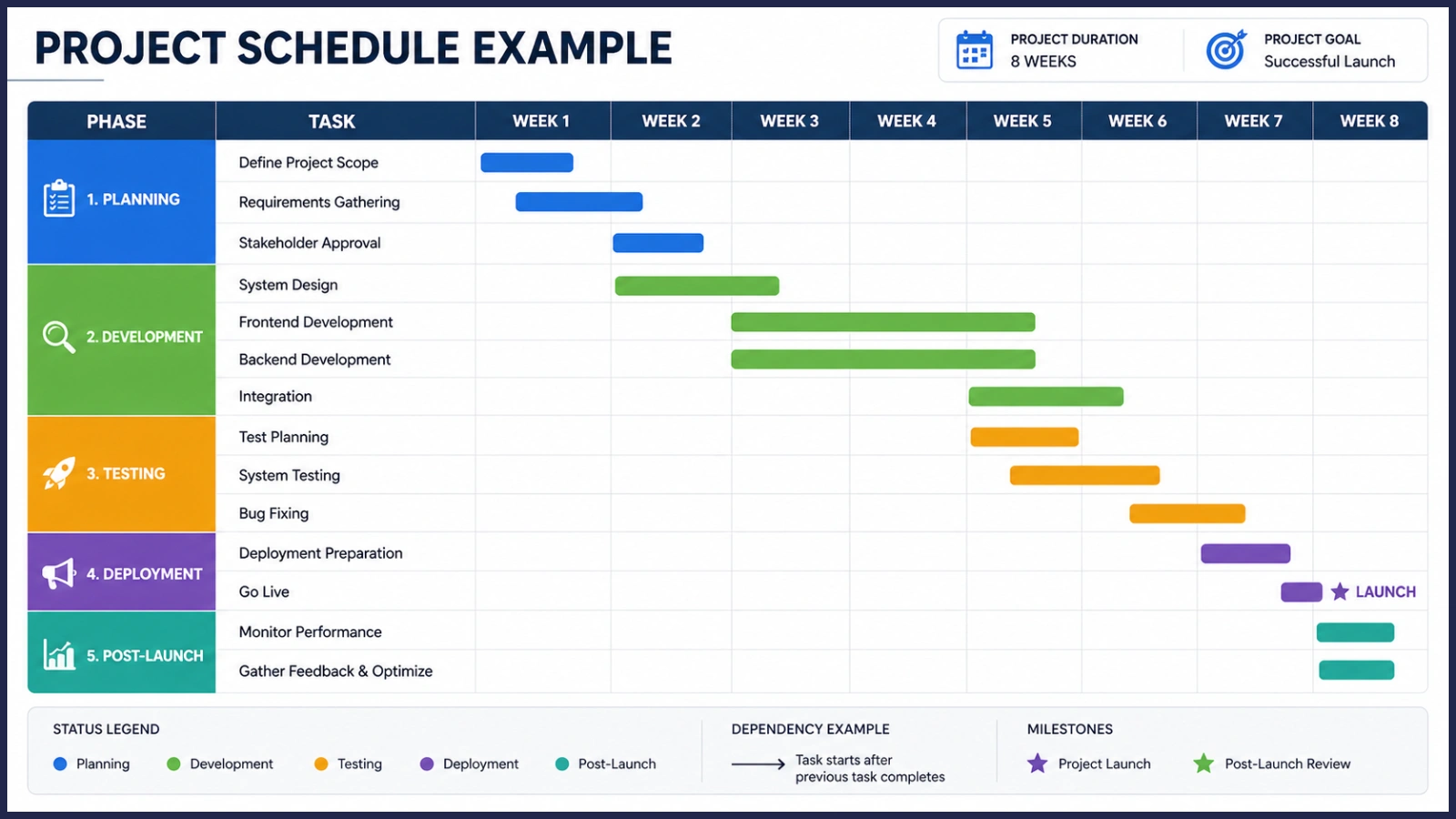
Let’s move from theory to something concrete. These examples are designed to reflect real workflows, not simplified diagrams.
Example 1 – Student Project Schedule
This example project schedule works well for academic assignments.
Week 1
- Choose topic
- Conduct research
- Collect references
Week 2
- Create outline
- Write the first draft
Week 3
- Edit content
- Final proofreading
- Submit project
This structure is simple and linear. It works because each step naturally leads to the next.
Example 2 – Business Project Schedule (Marketing Campaign)
A business project schedule involves more coordination.
First week
- Market research
- Define campaign goals
Second week
- Content planning
- Design assets
Third week
- Launch campaign
- Monitor performance
Fourth week
- Analyze results
- Optimize strategy
Here, dependencies matter. You cannot launch before assets are ready. You cannot optimize without data.
Example 3 – Project Schedule Example Implementation (IT/Product)
This project implementation schedule example shows a more complex setup.
First Phase: Planning (Week 1-2)
- Requirement gathering
- Stakeholder approval
Second Phase: Development (Week 3-6)
- Build features
- Conduct testing
Third Phase: Deployment (Week 7)
- Launch product
- Monitor system
Fourth Phase: Post-Launch (Week 8)
- Fix issues
- Gather feedback
This type of schedule includes phases, milestones, and cross-team coordination. It is less linear and more interconnected.
How to Create Your Own Project Schedule (Without Overcomplicating It)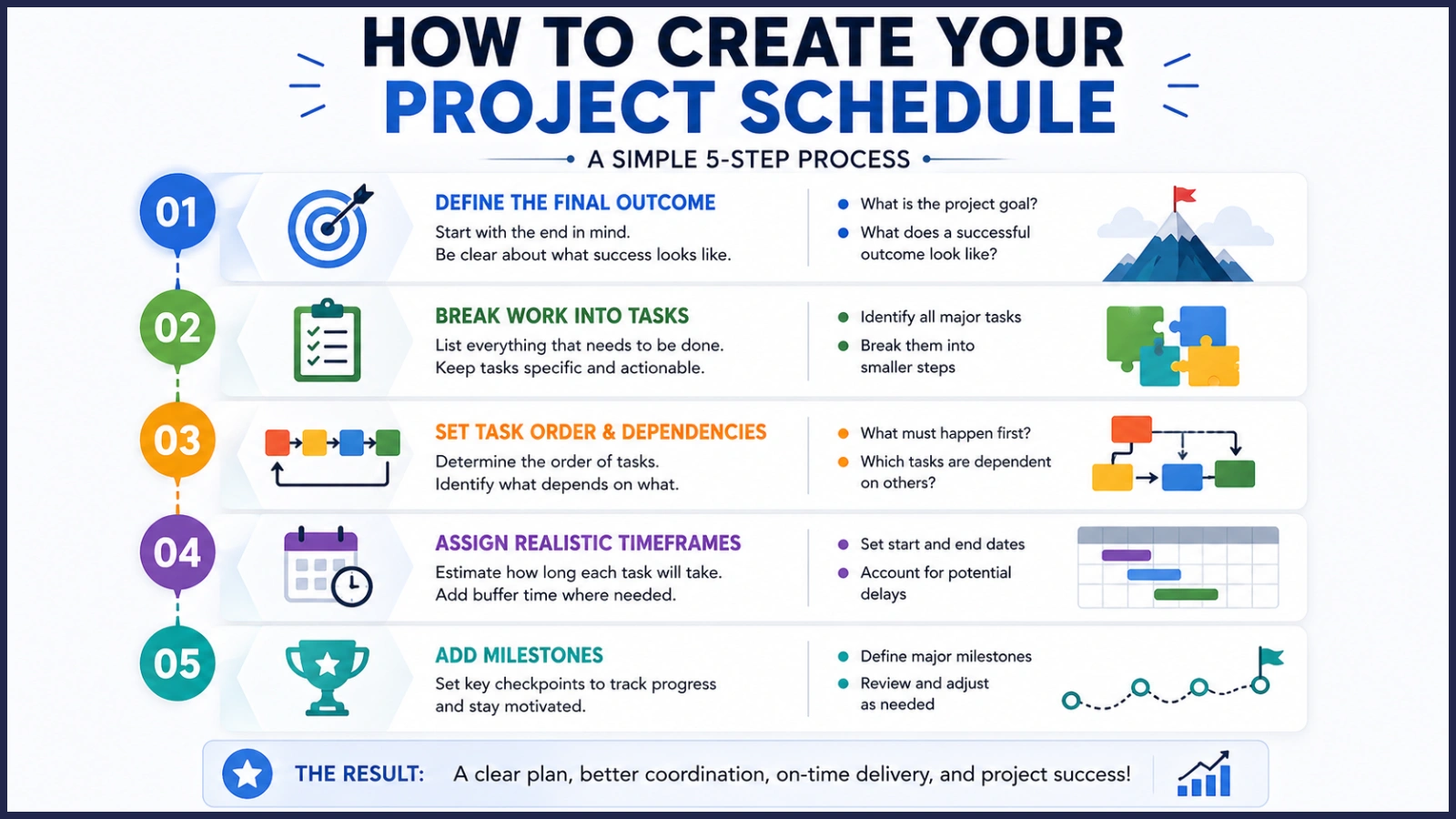
You do not need advanced tools to build a strong project schedule. You need a clear way of thinking.
First Step – Define the Final Outcome
Start with the end. What does success look like?
If the goal is unclear, every task that follows becomes uncertain.
Second Step – Break Work into Tasks
List everything that needs to happen. Keep tasks specific and actionable.
Instead of “work on project,” write “create outline” or “design homepage.”
Third Step – Set Task Order and Dependencies
Ask a simple question. What must happen before something else can begin?
This step prevents bottlenecks later.
Fourth Step – Assign Realistic Timeframes
People often underestimate how long tasks take. Build in extra time where needed.
A realistic schedule is always better than an optimistic one.
Fifth Step – Add Milestones
Milestones act as checkpoints. They help you measure progress without reviewing every small task.
This method turns a basic plan into a structured project plan schedule example you can actually follow.
Different Types of Project Schedules (And When to Use Each)
Not every project needs the same structure. Choosing the right format makes execution easier.
Simple Timeline Schedule
Best for small or personal projects. It keeps things easy to follow without extra layers.
Gantt Chart Style
Useful for larger projects with many dependencies. It shows how tasks overlap and connect.
Agile or Sprint-Based Schedule
Ideal for fast-moving teams. Work is divided into short cycles instead of long timelines.
Calendar-Based Schedule
Great for daily execution. Tasks are mapped directly to dates, making tracking simple.
Turning an Example into Your Own Project Plan Schedule
Seeing a project schedule example is helpful. Adapting it is where real value comes in.
Start by adjusting timelines based on your workload. A three-week plan might become five weeks for a larger project.
Then, scale complexity. Add more detail if your project involves multiple people or moving parts.
Finally, assign roles clearly. A schedule becomes far more effective when everyone knows their responsibility.
Where Most Project Schedules Go Wrong (And How to Fix Them)
Even a well-designed schedule can fail if certain mistakes slip in.
Unrealistic Time Estimates
People tend to plan for best-case scenarios. Delays happen when reality does not match those expectations.
Fix: Add buffer time to critical tasks.
Ignoring Task Dependencies
Tasks often depend on each other, even if it is not obvious at first.
Fix: Map out task order before assigning deadlines.
Overloading Teams
Too many tasks at once reduce efficiency.
Fix: Balance workload across time instead of stacking everything early.
No Flexibility Built In
Rigid schedules break easily when something changes.
Fix: Leave space for adjustments without disrupting the entire plan.
How EmpCloud Helps You Turn a Simple Schedule into a High-Performance Workflow
Creating a project schedule example on paper is one thing. Managing it in real time is another challenge.
EmpCloud bridges that gap by turning static schedules into dynamic workflows.
With the right system in place, your schedule becomes easier to manage and adapt.
Key benefits include:
- Real-time tracking of project progress
- Centralized task and timeline management
- Clear visibility across teams
- Automated updates to reduce manual effort
- Smarter resource allocation
- Instead of updating spreadsheets, you can focus on execution.
Advanced Insight: Why Great Project Schedules Are More About Thinking Than Tools
Many people believe better tools lead to better schedules. That is only partly true.
A strong project schedule example reflects clear thinking. It shows decisions about priorities, timing, and dependencies.
Tools can support that thinking, but they cannot replace it.
Simple schedules often work better because they are easier to understand and follow. When a schedule becomes too complex, people stop using it.
The goal is not perfection. It is clarity.
Read More!
A Clear Schedule Is the Shortcut to Better Results
A good project schedule example does more than organize tasks. It creates a clear path from idea to outcome. Instead of juggling scattered responsibilities, you begin to see how each piece of work fits into a larger sequence.
That clarity changes how you approach decisions. When you know what comes next, you spend less time guessing and more time executing. Small choices become easier because they are guided by a defined timeline, not uncertainty.
Progress also becomes easier to track. You are no longer relying on gut feeling to judge how things are going. Each completed task, each milestone reached, gives you visible proof that the project is moving forward.
Delays, when they happen, stop feeling overwhelming. You can trace where things slowed down, adjust the schedule, and keep the project on track without losing control. Instead of reacting late, you respond early.
Starting simple is often the smartest move. A basic structure with clear tasks and timelines works better than an overly detailed plan that no one follows. As the project evolves, you can refine and expand your schedule without disrupting progress.
Over time, this approach builds confidence. You move from reacting to problems to anticipating them. What once felt chaotic starts to feel manageable, and eventually, predictable.
That is how projects shift from confusion to completion. Not through complexity, but through clarity that guides every step forward.
FAQs: What People Still Get Confused About
What is the difference between a project plan and a project schedule?
A project plan covers the overall strategy, while a project schedule focuses on timelines and task execution.
How detailed should a project schedule be?
Detailed enough to guide action, but not so complex that it becomes hard to manage.
Can small projects skip scheduling?
Even small projects benefit from a simple structure. It prevents confusion later.
What is the easiest way to create a project schedule?
Start with tasks, arrange them in order, assign timelines, and add milestones.
How often should you update a project schedule?
Regularly. Weekly updates work well for most projects.
Quick Search Our Blogs
Type in keywords and get instant access to related blog posts.

