
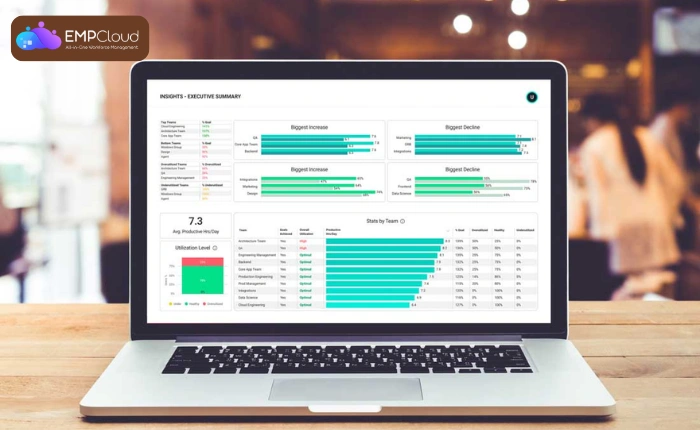
Decision-making feels easier when information stays clear, organized, and accessible. Leaders manage multiple teams, tasks, and goals, so scattered data creates delays and confusion. Executive dashboards fix this by giving one real-time view of performance, metrics, and trends. Instead of relying on outdated reports, leaders access live insights and take faster action with confidence.
This blog explains what executive dashboards do, their features, and the types of leaders use to improve clarity and decision accuracy. With the right dashboard setup, leadership becomes more strategic, aligned, and effective.
Listen To The Podcast Now!
What Are Executive Dashboards and Why Do They Matter?
Executive dashboards give leaders a single place to access workforce data, business performance, projects, and operational updates. Instead of switching between reports, emails, and spreadsheets, leaders view real-time insights in one organized interface. This creates clarity and reduces time spent searching for information.
Who Uses Them?
Leaders such as CEOs, department heads, HR managers, finance teams, operations managers, and project leaders rely on executive dashboards. They work in environments where quick decisions matter, so they need immediate access to accurate data.
Why Real-Time Insights Matter?
Data loses value when it becomes outdated. Real-time insights help leaders identify problems early, measure progress accurately, and act fast when something needs attention. Executive dashboards provide an always-current source of truth, supporting faster decisions and stronger business performance.
Key Features Every Executive Dashboard Should Include
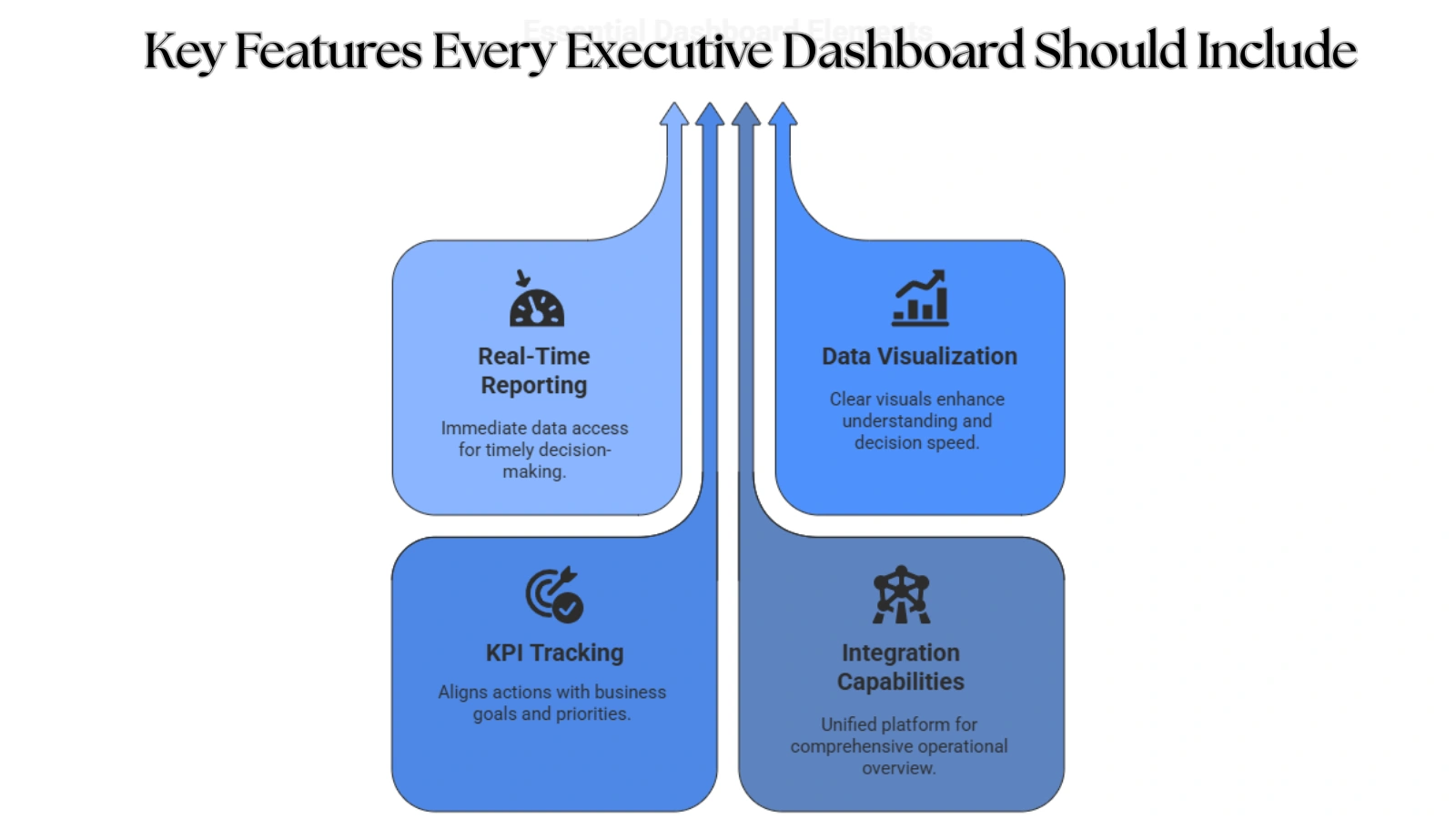
A well-built executive dashboard does more than display numbers. It organizes complex business information into a clear, simple, and actionable format. The right features help leaders monitor progress, evaluate performance, and make decisions with confidence. Below are the essential elements every executive dashboard must have.
Real-Time Reporting
Real-time reporting gives leaders immediate access to current data rather than waiting for weekly or monthly reports. It helps identify performance gaps, delays, or opportunities as they occur. Live insights support fast, accurate decision-making without guesswork.
Data Visualization
Charts, graphs, maps, and visual widgets make information easy to understand at a glance. Leaders see trends, performance changes, and patterns quickly. This visual clarity reduces confusion and improves decision speed, especially when teams or data volumes grow.
KPI Tracking
Tracking key performance indicators keeps leadership aligned with business goals. It ensures every action connects to growth, productivity, or efficiency targets. A strong executive dashboard highlights priorities and prevents distractions or wasted effort.
Integration Capabilities
A powerful dashboard connects multiple systems and tools into one platform. HR records, attendance data, project updates, and financial reports all sync automatically. This integration eliminates tool-hopping and gives leaders a unified view of operations.
Types of Dashboards Leaders Use for Better Results
Different dashboards serve different leadership needs. While all dashboards provide visibility, each one focuses on a specific purpose: performance monitoring, strategy alignment, forecasting, or execution management. Understanding these dashboard types helps leaders choose the right structure for their goals.
Management Dashboard
A management dashboard supports strategic oversight and helps leaders monitor high-level business performance. It gives a clear snapshot of operational health, efficiency, and growth in one view.
Key metrics include:
- Team utilization
- Attendance
- Performance scorecards
- Business health indicators
Best use case: long-term planning, departmental alignment, and executive-level reviews.
Productivity Dashboard
A productivity dashboard focuses on how efficiently teams operate. Leaders track engagement, workload, performance consistency, and output quality across departments.
Insights include:
- Work hour data
- Task completion rates
- Efficiency gaps
- Workforce patterns
This dashboard helps identify top performers, bottlenecks, and opportunities for optimization.
Analytics Dashboard
An analytics dashboard provides deeper insights using advanced data analysis. Leaders study patterns, extract meaning from trends, and forecast outcomes before challenges arise.
Key capabilities include:
- Trend patterns
- Predictive analytics
- Forecast modeling
This dashboard supports growth planning, risk assessment, and long-term strategy development.
Project Management Dashboard
A project management dashboard ensures project visibility from planning to execution. Leaders track task progress, resources, and deadlines to prevent delays and misalignment.
Common indicators:
- Deadlines
- Budgets
- Resource distribution
- Status updates
Executives maintain control without micromanagement and ensure smooth delivery across teams and timelines.
How Dashboard Software Simplifies Decision-Making?
Dashboard software turns complex information into simple, meaningful visuals that leaders can act on. Instead of sorting through reports and spreadsheets, executives get instant clarity in one place. With the right solution, decisions become faster, more accurate, and aligned with organizational goals.
What To Look For In Dashboard Software
Scalability
Your platform should grow with your organization. It must support more users, more modules, and expanding data sources without slowing down or requiring major rebuilding.
Customization
Every business operates differently. The ideal dashboard allows flexible layouts, personalized views, custom KPIs, and department-based filtering so leaders only see what matters.
Automation
Automation removes repetitive manual reporting. Scheduled reports, auto-refreshed metrics, and real-time alerts save time and ensure leadership always has updated insights.
User-Friendly Interface
A clean and intuitive interface boosts adoption. Executives engage better when dashboards are easy to navigate, visually clear, and require little training.
Read More!
How Do Project Management Statistics Impact Your Bottom Line?
How To Improve Efficiency With Real Time Employee Tracking
Common Challenges And How To Avoid Them
Unclear KPIs often create confusion and inconsistency in reporting. Too much data can overwhelm leaders, reducing focus instead of improving results. Lack of integration forces constant switching between tools, slowing processes. Security weaknesses put sensitive information at risk.
A strong, well-built software solution eliminates these issues, keeping decision-making smooth, efficient, and data-driven.
Why Choose EmpCloud For Better Workforce Management?
Modern leadership relies on clarity, speed, and data accuracy, and EmpCloud delivers all three in one place. With unified workforce insights, executives see operations, performance, HR movement, and project progress without switching platforms. Every metric updates live, helping leaders make fast, informed decisions backed by real data instead of assumptions.
Manager-Centric Strengths
Leaders track workforce hours with Time Tracking, analyze productivity with real-time performance data, and monitor field operations through Geo-Location Tracking. Task assignment feels smooth with Manage Tasks and Opportunity, and executives generate detailed reports in seconds.
HR-Driven Capabilities
EmpCloud removes attendance complexity using Face Recognition Attendance and Contactless Attendance. Teams manage leave, attendance, and access history without confusion. Onboarding and compliance feel smooth with Policy and Document Management, Automated Timesheets, and Payroll Management.
Productivity + Security Advantage
EmpCloud protects business assets with Data Loss Prevention and offers smart workforce visibility through unified metrics, live locations, time sheets, and performance scorecards.
This combination makes EmpCloud a complete workforce intelligence solution that aligns perfectly with executive dashboards.
Step-By-Step Guide: How To Build Your First Executive Dashboard?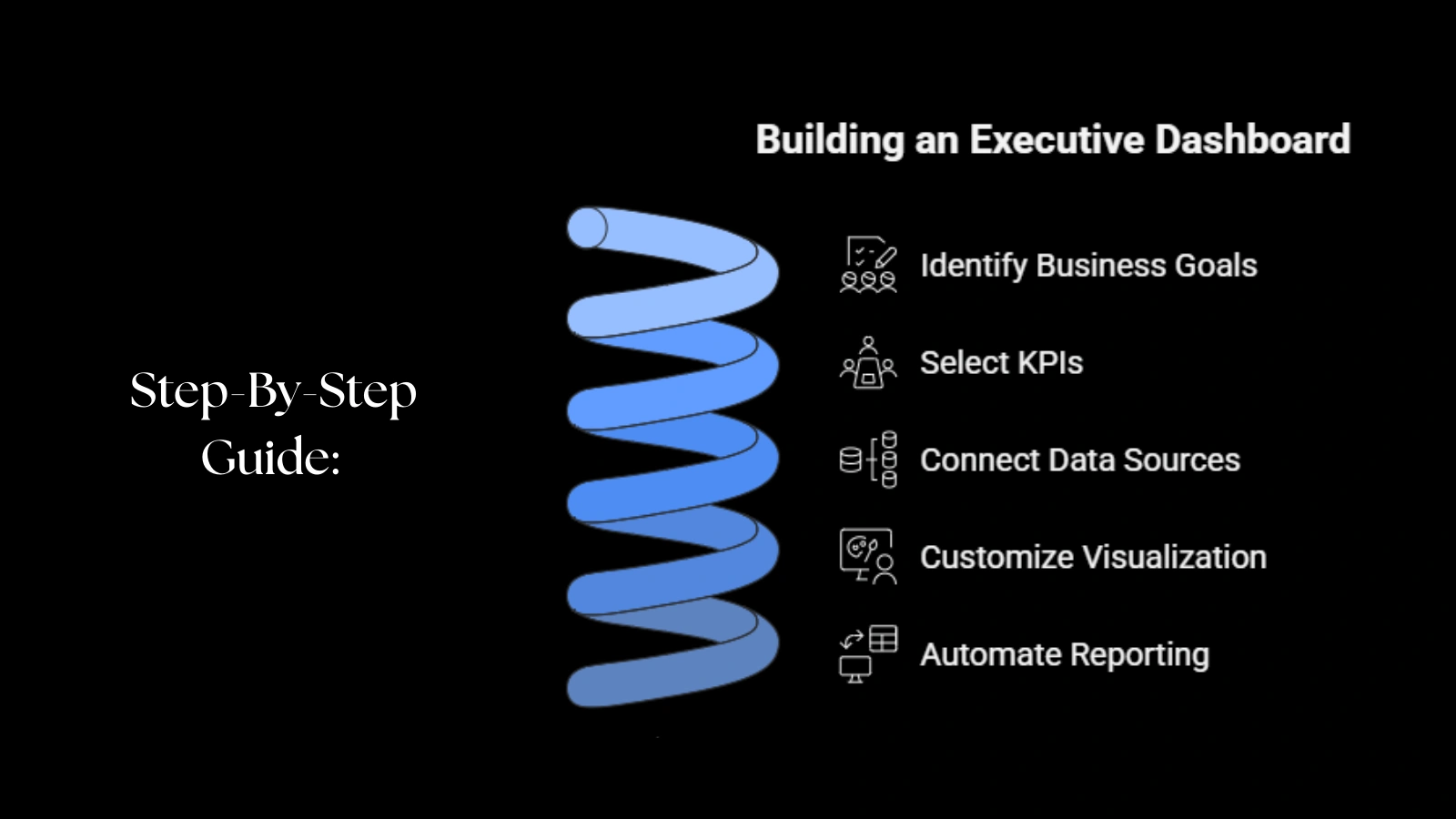
A clear process keeps dashboard projects focused and fast. Follow these five steps to build an executive dashboard that delivers real insight and drives better decisions.
1: Identify Business Goals
Define the outcomes you need: raise productivity, cut costs, improve on-time delivery, or boost customer satisfaction. Tie the dashboard to one or two priority goals so every metric supports action.
2: Select KPIs
Pick measurable KPIs that link directly to your goals. Examples include utilization rate, on-time task completion, error rate, and average resolution time. Limit KPIs to the most meaningful ones to avoid clutter and confusion.
3: Connect Data Sources
Link attendance systems, HR records, project tools, time sheets, and communication logs to one platform. Consolidated data ensures the dashboard shows a single source of truth and removes manual data gathering.
4: Customize Visualization
Match visuals to the insight: use trend lines for historical context, progress bars for milestones, heat maps for location data, and KPI tiles for at-a-glance status. Arrange the layout so executives find priority information within two clicks.
5: Automate Reporting
Set up automated refresh cycles, alerts, and scheduled reports so leaders receive timely updates without manual work. Automation keeps the dashboard current and frees teams to act on insights rather than prepare them.
Best Practices To Keep Your Executive Dashboard Effective
An executive dashboard delivers the strongest value when it stays clear, updated, and aligned with business goals. Leaders should treat it as an evolving tool rather than a one-time setup. With the right maintenance habits, the dashboard continues to support fast, confident decision-making and avoids becoming cluttered or outdated.
Keep Metrics Purpose-Driven
Every metric should connect directly to a business objective. If a number doesn’t guide action or influence planning, remove it. A focused dashboard prevents confusion and keeps leadership’s attention on what matters most.
Audit Dashboards Monthly
A monthly review ensures data accuracy and relevance. This helps identify outdated metrics, missing integrations, or unnecessary widgets. A regular audit keeps insights fresh and ensures the dashboard reflects current business conditions.
Review Kpis As Business Priorities Evolve
When strategies change, whether scaling teams, launching new projects, or improving operational efficiency, KPIs should shift with them. A flexible dashboard continues to provide value because it evolves with new goals and expectations.
Ensure Teams Have Access To Relevant Data Only
Role-based access prevents clutter and safeguards sensitive information. Each user should view only the data that supports their responsibility or function. This keeps the dashboard efficient, secure, and easy for everyone to use.
A well-maintained executive dashboard becomes a long-term intelligence system that supports clarity, alignment, and strong execution.
Real-World Examples: Executive Dashboards In Action
Executive dashboards deliver measurable impact when leaders use them to monitor performance, identify bottlenecks, and act with clarity. Many organizations shift away from spreadsheets and manual reports because dashboards provide live visibility and faster accuracy. The following real scenarios highlight how executive dashboards create improvement in different environments:
- A service company raised workforce efficiency after replacing spreadsheets with a productivity dashboard.
Leaders viewed attendance, task completion, and performance data in one place. That single change reduced time spent searching for data and helped managers correct workflow gaps proactively. - A growing SaaS startup cut project delays after adopting a project management dashboard.
With visible deadlines, task status updates, and resource assignments, teams worked with stronger accountability. Delays dropped because leadership could intervene before risks turned into failures. - A retail chain improved staff alignment through real-time analytics from an analytics dashboard.
Store managers monitored sales insights, employee utilization, and customer activity live. Decisions matched real demand, which increased operational consistency across multiple locations.
Each example shows how executive dashboards reshape performance, speed decision-making, and turn scattered insights into a clear strategy. When leaders gain visibility and control, the entire organization moves with direction, not guesswork.
Final Thoughts:
Strong decisions come from clear insight, not scattered data. Executive dashboards give leaders real-time visibility over performance, progress, and priorities, making action faster and smarter. With the right structure and KPIs, leaders stop guessing and start leading with confidence.
EmpCloud supports this approach by offering live reporting, automation, and unified workforce visibility, making decision-making smooth and precise. With the right dashboard in place, clarity replaces confusion and growth becomes predictable.
FAQs
- Who benefits from executive dashboards?
Executives, HR leaders, project managers, operations teams, and CEOs benefit the most because executive dashboards provide real-time visibility into performance, goals, and results. Teams make faster decisions, reduce delays, and maintain alignment. Anyone responsible for strategy, planning, or workforce oversight gains value from a centralized data view.
- Do dashboards help small businesses?
Yes. Small businesses rely on efficiency, and executive dashboards simplify tracking, planning, and resource allocation. They remove manual reporting, reduce errors, and help leaders monitor productivity, finances, and workforce performance. With clear insight, even small teams reach targets faster and operate with stronger control.
- How often should metrics change?
Metrics shift when priorities evolve, new goals form, or business needs change. Reviewing KPIs monthly or quarterly keeps the dashboard meaningful and aligned with business outcomes. When metrics stay current, insights stay relevant, and decisions become more accurate.
- Do executive dashboards replace traditional reporting?
Not completely. Traditional reports still support audits, compliance requirements, and historical documentation. However, executive dashboards make daily decisions smoother because they present real-time insights rather than static summaries. Together, both formats strengthen accuracy and operational clarity.
- How long does it take to build an effective executive dashboard?
Implementation time depends on data structure, chosen tools, and available integrations. Some dashboards take minutes when data is already organized, while others require setup for KPIs, data sources, and visualization formats. Once built, dashboards run continuously with minimal effort and automated updates.
Quick Search Our Blogs
Type in keywords and get instant access to related blog posts.

