
Most HR teams are fighting absenteeism with the wrong weapon. They tighten attendance policies. They add warning-letter workflows. They buy dashboards that show them, beautifully, how many people called in sick last quarter. None of it moves the needle. AI adoption in HR nearly doubled in a single year, jumping from 26% of organisations in 2024 to 43% in 2025. The gap between teams that see results and teams that don’t isn’t budget. It’s architecture.
The Attendance Policy Trap
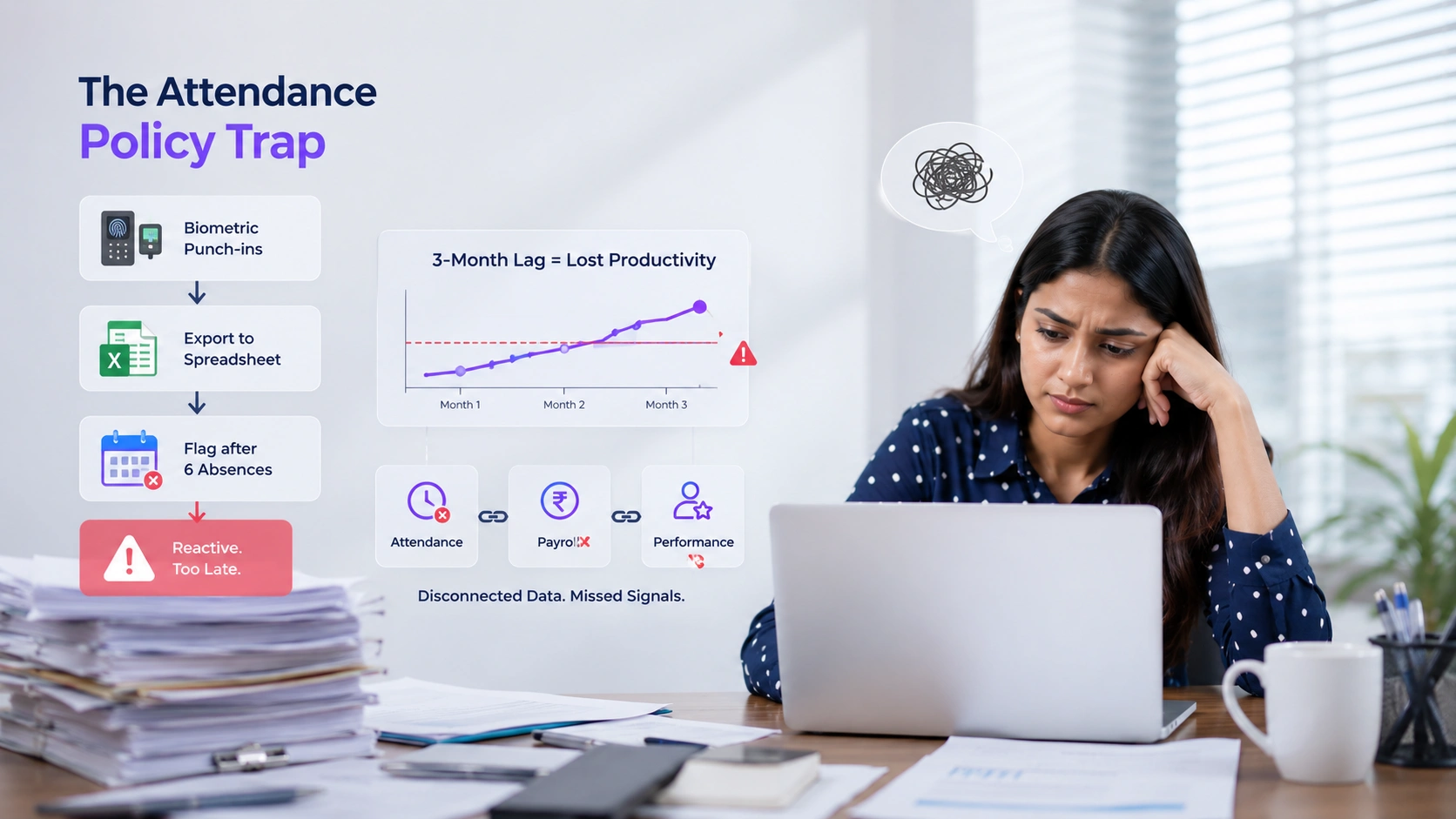
Here is the failure mode that plays out repeatedly. A 200-person company runs biometric punch-ins at every shift gate. It exports a spreadsheet to payroll at month-end. It flags employees who hit six absences in a rolling quarter. The HR manager calls it a system. It isn’t; it’s a reaction engine with a three-month lag.
By the time the sixth absence triggers a flag, the employee is already disengaged, possibly job-searching, and the team has absorbed five weeks of scrambled scheduling. The attendance data was there the whole time. It just wasn’t connected to anything that could interpret it.
Traditional HRMS deployments treat attendance, payroll, and well-being as three separate modules with three separate data stores. That’s the architectural mistake. Absenteeism is rarely random; it clusters around burnout signals, shift-pattern mismatches, and manager relationships. You can’t see those patterns in a punched-in/punched-out log. You need the log talking to performance review cycles, LMS completion rates, and payroll anomalies like persistent overtime. Every manual handoff between siloed systems is a point where leading indicators disappear into the gap.
Looking for more ways to improve employee engagement? Explore our guide on Best Employee Appreciation Ideas for a Happier Workplace.
What AI-Linked Well-Being Tracking Actually Does
When people hear “AI well-being tracking,” they picture mood-sensing cameras or keystroke logging. That’s not it. The practical version is far less exotic and far more useful.
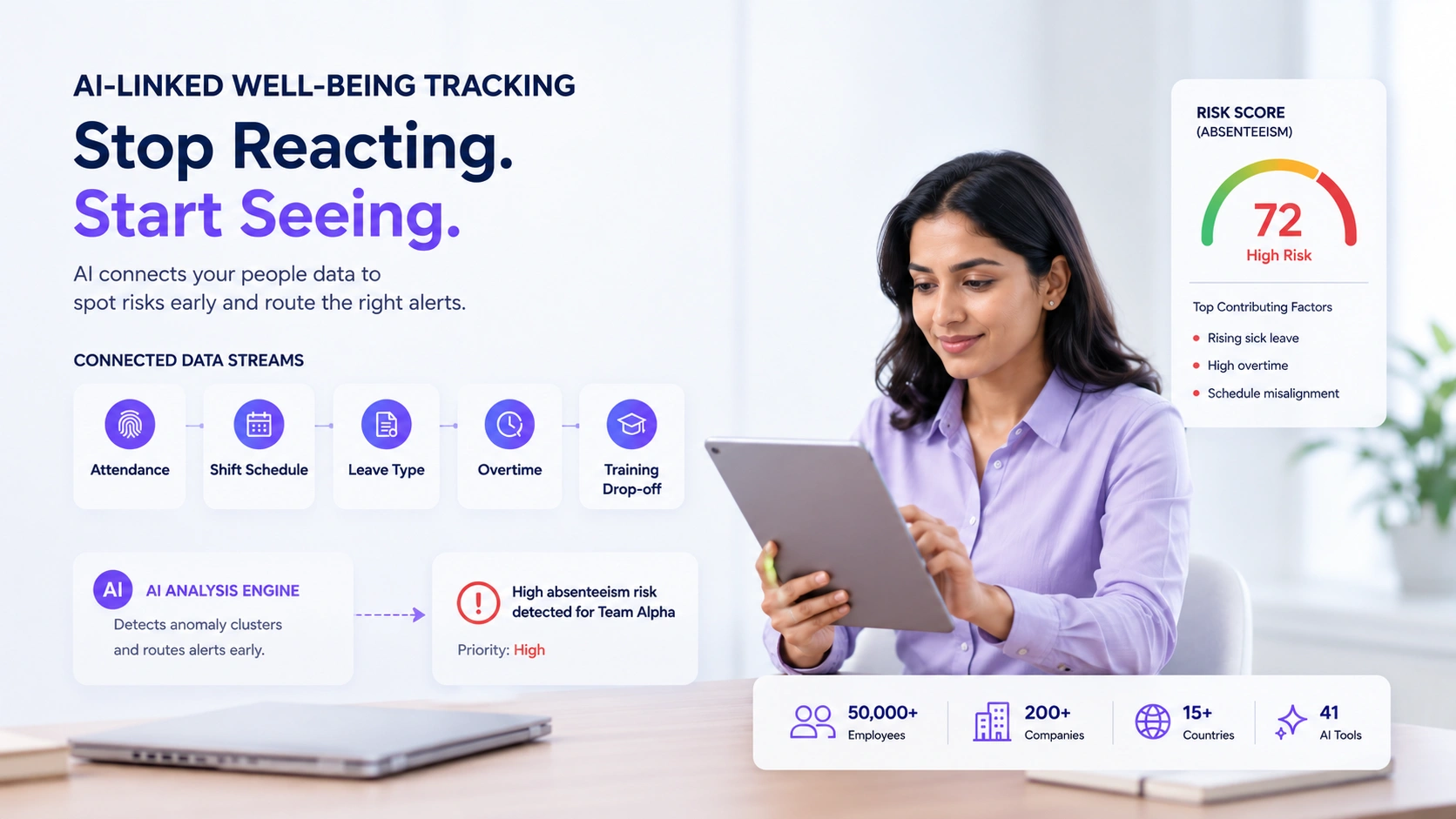
A properly wired HRMS surfaces patterns across connected data streams: biometric attendance frequency, shift schedule adherence, leave type distribution (sick vs. PTO vs. unpaid), overtime accumulation, and training module drop-off. The AI layer doesn’t make decisions. It scores anomaly clusters and routes them to the right person before an absence pattern becomes a resignation.
The key is what becomes visible when data stops living in silos. Attendance patterns that cluster around specific managers, shift types, or payroll anomalies only emerge when those feeds share a timeline. EmpCloud is an AI-powered HRMS built around this principle. It manages 50,000+ employees across 200+ companies in 15+ countries, and its Cross-Module Data Access puts attendance, leave, payroll, and performance into a single conversation. A correlation between shift-pattern stress and rising sick-leave frequency can surface as a live alert, not a three-month retrospective.
See it in action: book a 20-minute EmpCloud walkthrough and bring your biggest absenteeism headache; the cross-module view tends to answer it in the first five minutes.
The platform’s 41 AI tools span multiple major providers and let HR teams query that combined dataset in plain English, without bespoke SQL or analytics training. A real query an HR business partner might run: “Which teams have the highest ratio of unplanned sick leave to scheduled overtime in the last 60 days?” That single question, answered in seconds, would previously have required exports from three systems, a spreadsheet merge, and a BI analyst with a free afternoon. The Smart SQL tool handles the same kind of query for teams that need custom slices, still in natural language, no data-engineering ticket required. For context on how the same unified data layer powers learning outcomes, see how AI is reshaping employee training workflows.
There’s a structural headwind worth naming here. The technology only surfaces patterns when the data inputs are clean, and the people using the alerts are trained to act on them. Organisations that deploy AI alerting without investing in change management, clear routing rules, defined response owners, and feedback discipline routinely see adoption stall within weeks, regardless of how good the underlying platform is. Architecture is necessary. It is not sufficient.
The Integration Points That Matter
Not all HRMS architectures make this possible. Enterprise platforms in this space often require lengthy professional-services engagements at price points that shut out sub-500-employee companies, a common complaint visible in third-party reviews on G2’s HR Management Suites category. Mid-market teams consistently report that implementation complexity erodes the ROI promise before the system goes live.
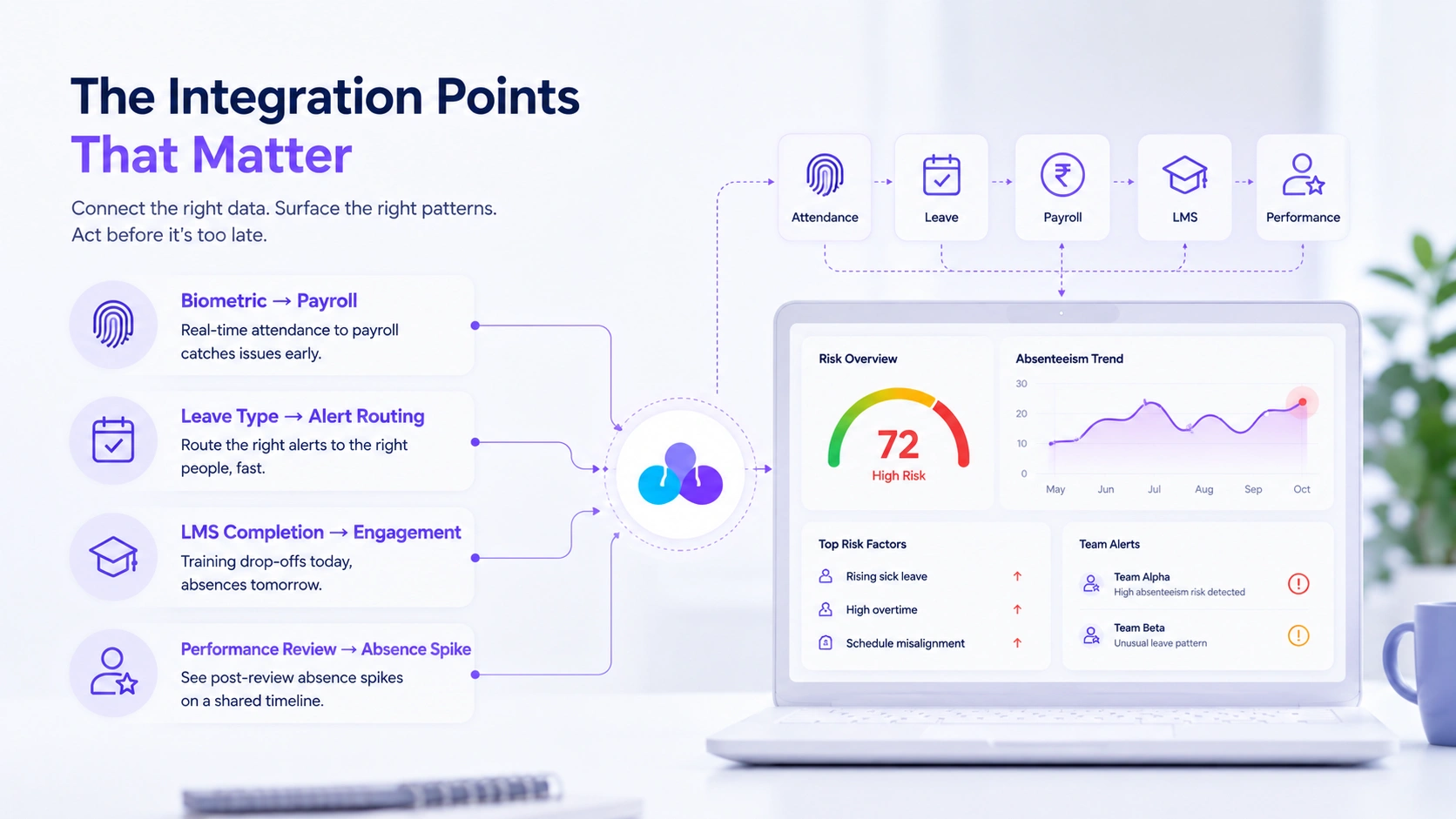
The integration points that actually surface patterns worth acting on are specific. Get these right, and the rest follows.
Biometric → Payroll, same day. Attendance data that reaches payroll in real time, not a month-end export, lets you catch scheduling issues before they compound. Persistent short shifts and early clock-outs are early burnout signals when read in aggregate.
Leave type classification → Alert routing. A spike in same-day sick leave on Mondays within a specific team is a manager’s problem, not an individual’s. The system needs to route the alert to someone who can act on that distinction, not dump it in a weekly digest nobody reads.
LMS completion rate → Engagement proxy. Employees who stop completing assigned training mid-module are often the same cohort accumulating unplanned absences four to six weeks later. Connecting your learning management data to your attendance trend view turns a lagging indicator into a leading one.
Performance review cadence → Absence spike timing. Post-review absence spikes are real and measurable. If your performance module and attendance module share a timeline, you can see this pattern clearly. Most platforms don’t share that timeline.
For more strategies on building a positive workplace culture, read our guide on Employee Relations: 15 Best Practices Every HR Team Should Follow in 2026.
A Practical Framework: Three Phases
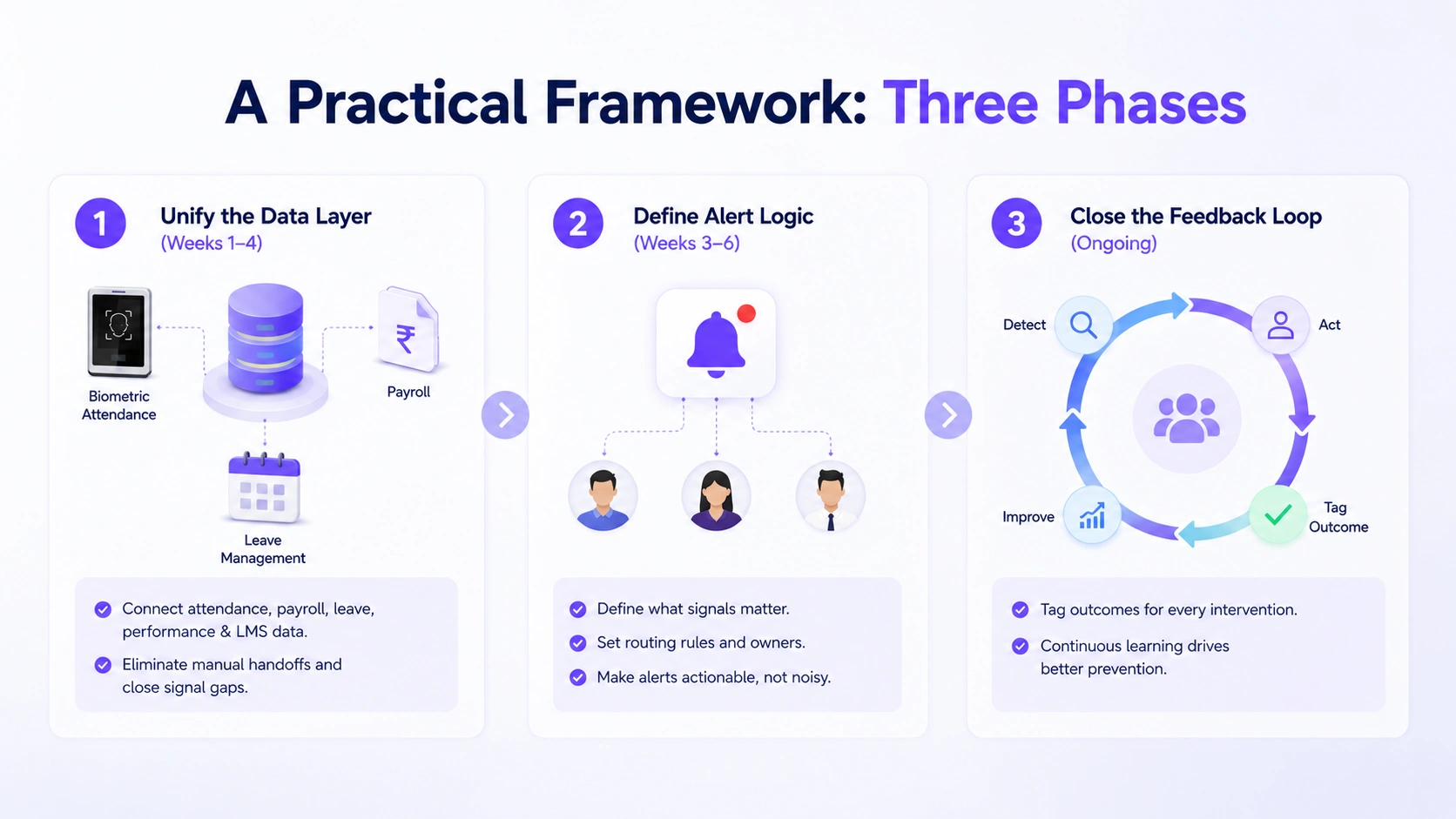
Phase 1, Unify the Data Layer (Weeks 1–4)
Before any AI feature does anything useful, your biometric attendance, payroll, and leave management data need to live in the same schema. Picture the typical mid-market setup: attendance logs in a standalone biometric system, payroll in a separate platform, leave requests managed through email. Every seam between them is where your AI absenteeism layer gets garbage input, not because the AI is weak, but because the inputs are broken.
EmpCloud’s unified HRMS connects facial recognition biometric attendance, payroll processing, performance cycles, and LMS data in a single platform, which is the prerequisite, not the feature. Map your current data flows and identify every manual handoff. Each one is a signal gap. The productivity research is stark: manual processes carry human error rates of 3–15%, while AI systems maintain accuracy above 95% for routine tasks like data entry and categorisation. That gap is where fragmented stacks bleed signal.
Phase 2, Define Alert Logic Before You Automate (Weeks 3–6)
This is where most implementations fail. Teams turn on AI alerting without agreeing on what constitutes a signal worth acting on. Write out your routing rules in plain language first: who receives a same-day sick leave cluster alert for a team of ten? The direct manager, the HR business partner, or both? What’s the expected response time? What action is actually possible? If you can’t answer those questions, the alert becomes noise and gets ignored within 30 days.
Phase 3, Close the Feedback Loop (Ongoing)
Every absence-prevention intervention needs an outcome tag. Did the early check-in with the employee lead to a schedule adjustment? A leave of absence? Nothing? Without tagging outcomes, your AI layer has no signal to improve from. This is operational discipline, not technology, but it’s what separates people ops teams that sustain improvement from teams that see a short-term dip and drift back to baseline.
What Doesn’t Work, And Why Teams Keep Trying It Anyway
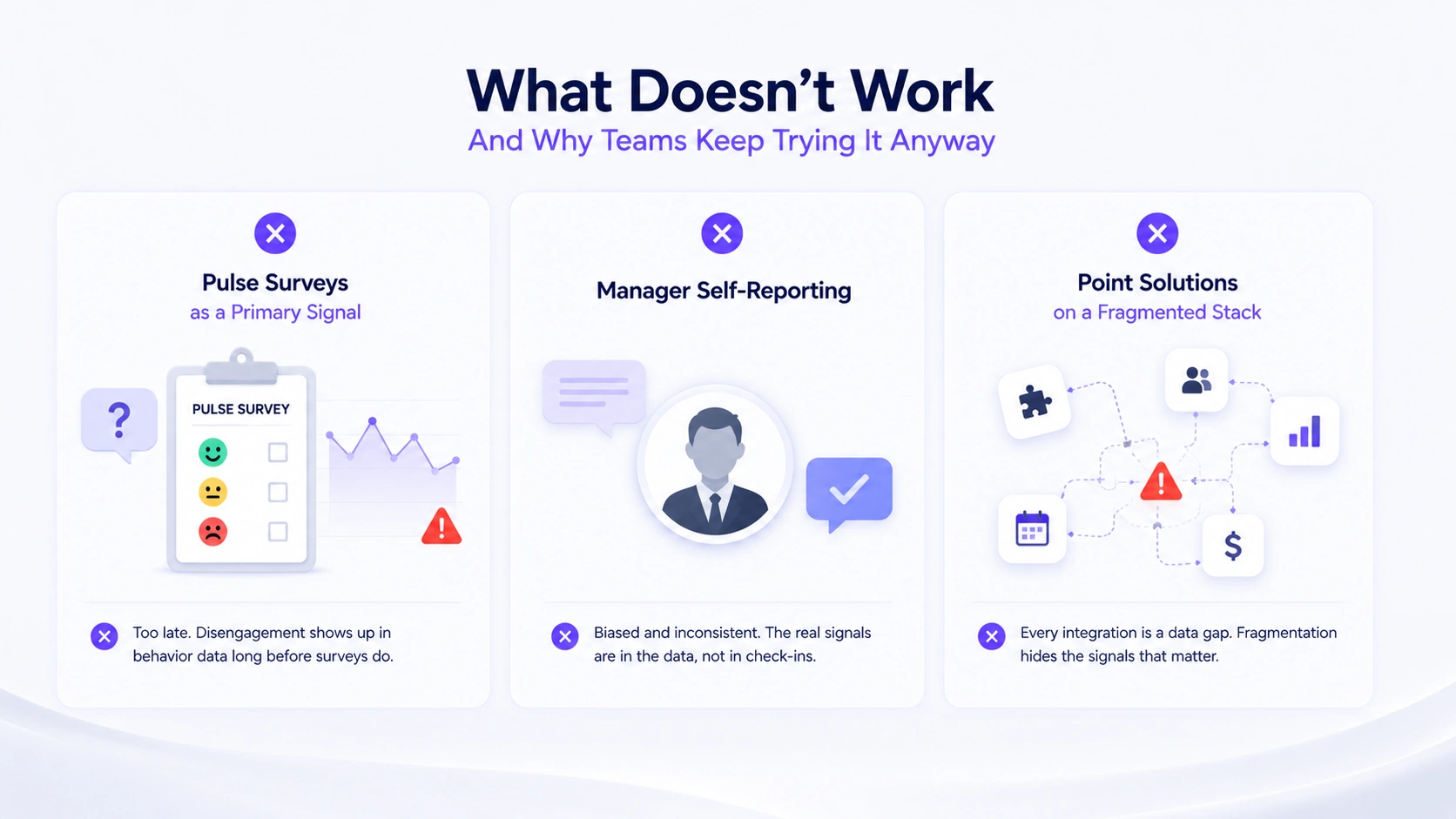
Pulse Surveys as a Primary Signal
The fundamental problem with pulse surveys isn’t their design; it’s their timing. By the point an employee’s disengagement is bad enough to produce a negative survey response, their absence pattern has already been building for weeks. The behavioral data is passive and always-on; the survey is periodic and opt-in. What makes this particularly costly is that the behavioral signal is already embedded in your attendance and leave data; it just needs a system that reads across modules to surface it. Routing a team’s Monday sick-leave spike to an HR business partner before the fourth occurrence is more actionable than any survey question ever fielded to the same team after the fact. Use pulse surveys as a confirmation layer, never as the primary detector.
Manager Self-Reporting
This one is structural, not a training problem. Managers who are the proximate cause of burnout, through persistent over-scheduling, poor shift distribution, or inconsistent workload allocation, are precisely the managers who will not self-report. The data layer has to be passive and behavioral for that reason. Consider what a cross-module attendance system actually captures: which managers’ teams accumulate the most unplanned overtime before sick-leave spikes, which shift patterns correlate with LMS drop-off, which team structures show recurring Monday absences. That pattern is invisible to a manager’s check-in form. It is visible, immediately, in a unified attendance and payroll timeline. The reason unified HRMS platforms with cross-module workforce visibility are replacing manager-reported check-ins is simple: the signal is already in the data.
Point Solutions Bolted onto a Fragmented Stack
The HR AI tools market spans recruitment, onboarding, performance, and engagement; each category has credible standalone vendors. The temptation is to buy the best point solution in each. The problem: every integration is a data seam, and data seams are where leading indicators disappear. A company running five best-of-breed tools often has worse absenteeism visibility than one running a mid-tier unified platform. Fragmentation is expensive in ways that never appear on the software procurement invoice.
Starting Points for This Week
Pull your last six months of absence data and sort it by team, not individual. If one team has three times the absence rate of a comparable team, you have a management or scheduling problem, not a workforce problem. That single cut of the data is often the most actionable thing a people ops team can do before touching any technology.
Then ask your HRMS vendor one question: Can I see a combined view of attendance trends and LMS engagement for a given team, without an export? If the answer involves a spreadsheet, you’ve found your architectural gap. EmpCloud’s 250+ API endpoints and integrated people-ops suite were built to make that view native: attendance, payroll, performance, and learning in one place, so the patterns that predict absenteeism are visible before they become headcount problems. For a deeper look at how AI tools compare across HR functions, the AI productivity tools comparison is worth a read alongside this piece.
The infrastructure work isn’t glamorous. There’s no shortcut to it either. Build the unified data layer first, define your routing logic second, close the feedback loop third, in that order. Everything else is a dashboard on top of noise.
Start your free 15-day EmpCloud trial and see how unified attendance and well-being data changes what your HR team can actually act on.
Quick Search Our Blogs
Type in keywords and get instant access to related blog posts.

