
An employee clocks in at 9:05 AM, takes a 45-minute lunch break, and clocks out at 6:10 PM. How many hours did they actually work? Now imagine calculating the same thing for 30, 100, or 500 employees, each with different shifts, break durations, overtime hours, and attendance records.
This is where things can get complicated.
Tracking working hours may seem like a small administrative task, but even minor calculation errors can create problems when preparing payroll, reviewing overtime, or checking attendance. A missed break entry or an incorrect AM/PM selection can throw off the final working-hour total.
A time clock calculator makes these calculations much easier. Employees or managers can enter clock-in times, clock-out times, and break durations to determine the hours worked without relying on manual arithmetic.
In 2026, as businesses manage larger teams, flexible schedules, and different working arrangements, accurate time tracking has become increasingly important. A reliable calculator helps simplify everyday calculations, while a structured time-tracking process helps businesses maintain dependable attendance and payroll records.
Let’s explore how these tools work, why businesses rely on them, and how to use them effectively.
In a hurry? Listen to the blog instead!
What Is a Time Clock Calculator?
A time clock calculator is a tool that calculates the time an employee spends working between their starting and ending times. Depending on its features, it can also account for unpaid breaks, calculate overtime, and display total hours in hours-and-minutes or decimal format.
Instead of subtracting the clock-in time from the clock-out time manually, users enter the relevant details and let the calculator do the arithmetic.
For example, suppose an employee works from 9:00 AM to 5:30 PM and takes a 30-minute unpaid break.
- Clock-in time: 9:00 AM
- Clock-out time: 5:30 PM
- Total elapsed time: 8 hours and 30 minutes
- Unpaid break: 30 minutes
- Total working time: 8 hours
The calculation is straightforward, but repeating it for an entire workforce can consume a surprising amount of time. A time clock calculator handles the arithmetic consistently, reducing the risk of mistakes caused by rushed calculations or inconsistent record-keeping.
Businesses can use a calculator for daily attendance checks, weekly timesheet reviews, overtime estimates, and preliminary payroll calculations.
However, a calculator is not necessarily an attendance tracking system. It calculates the information entered into it; it does not automatically verify whether an employee was present unless it is connected to a suitable time-tracking system.
Why Businesses Need Time Clock Calculators in 2026

The way businesses manage employee working hours has changed. Teams may work in offices, at client locations, on rotating shifts, or remotely. Some employees follow fixed schedules, while others have different start times or work beyond their usual hours.
These arrangements make accurate time calculations more important than ever.
1. Manual Calculations Become Difficult as Teams Grow
When a business has five employees, checking their working hours manually may be manageable. As the team expands, the same process becomes harder to maintain.
Imagine an HR manager reviewing timesheets for 80 employees at the end of the week. Each employee has different clock-in times, clock-out times, and break durations. Some records may contain missing entries, while others may need overtime calculations.
The manager must check every record, calculate the hours, and verify the totals before passing the information to payroll.
A time clock calculator simplifies the calculation stage. Instead of working out every duration manually, managers can calculate individual shifts more quickly and focus their attention on entries that need clarification.
2. Small Time Errors Can Affect Payroll
A difference of 10 or 15 minutes might appear insignificant when reviewing one timesheet. Across several employees and multiple working days, however, small discrepancies can accumulate.
For example, an employee’s recorded shift may run from 8:50 AM to 5:20 PM, with a 30-minute unpaid break. The total working time is eight hours.
If the break is accidentally entered as 45 minutes, the calculated total falls to seven hours and 45 minutes. That difference may affect the preliminary payroll calculation if the incorrect record is not corrected.
A clock time calculator helps ensure that the arithmetic is consistent with the information provided. Businesses must still verify the original attendance records, applicable break policies, and pay rules before finalizing wages.
3. Different Shifts Require More Careful Tracking
Not every employee works from 9 AM to 5 PM. Manufacturing units, hospitals, customer support teams, restaurants, and logistics businesses often operate across multiple shifts.
Night shifts create an additional challenge because the clock-out time may fall on the following calendar day.
For instance, an employee starts at 10:00 PM and finishes at 6:00 AM the next morning. The shift lasts eight hours before deducting any unpaid breaks.
Subtracting the times without accounting for the change of day can produce an incorrect result. A calculator that supports overnight shifts makes this calculation easier and helps managers avoid a common timesheet mistake.
Businesses should also distinguish between elapsed time, payable hours, and overtime, since these may be governed by different policies.
How to Use a Time Clock Calculator Correctly
A time clock calculator is generally simple to use, but accurate results depend on entering the correct information.
Follow these steps to calculate working hours.
Step 1: Enter the clock-in time
Enter the time the employee started work. Check whether the time uses a 12-hour or 24-hour format, and confirm AM or PM where applicable.
Step 2: Enter the clock-out time
Add the employee’s ending time. For overnight shifts, make sure the calculator supports shifts that cross midnight or allows you to specify the correct dates.
Step 3: Add the break duration
Enter the duration of unpaid breaks, if the calculator provides that option. Paid breaks should be handled according to the employer’s applicable policy and the tool’s available settings.
Step 4: Calculate the total working hours
Run the calculation to obtain the duration of the shift after accounting for the entered break time.
Step 5: Review and record the result
Check the calculated total against the original attendance record before including it in a timesheet or payroll worksheet.
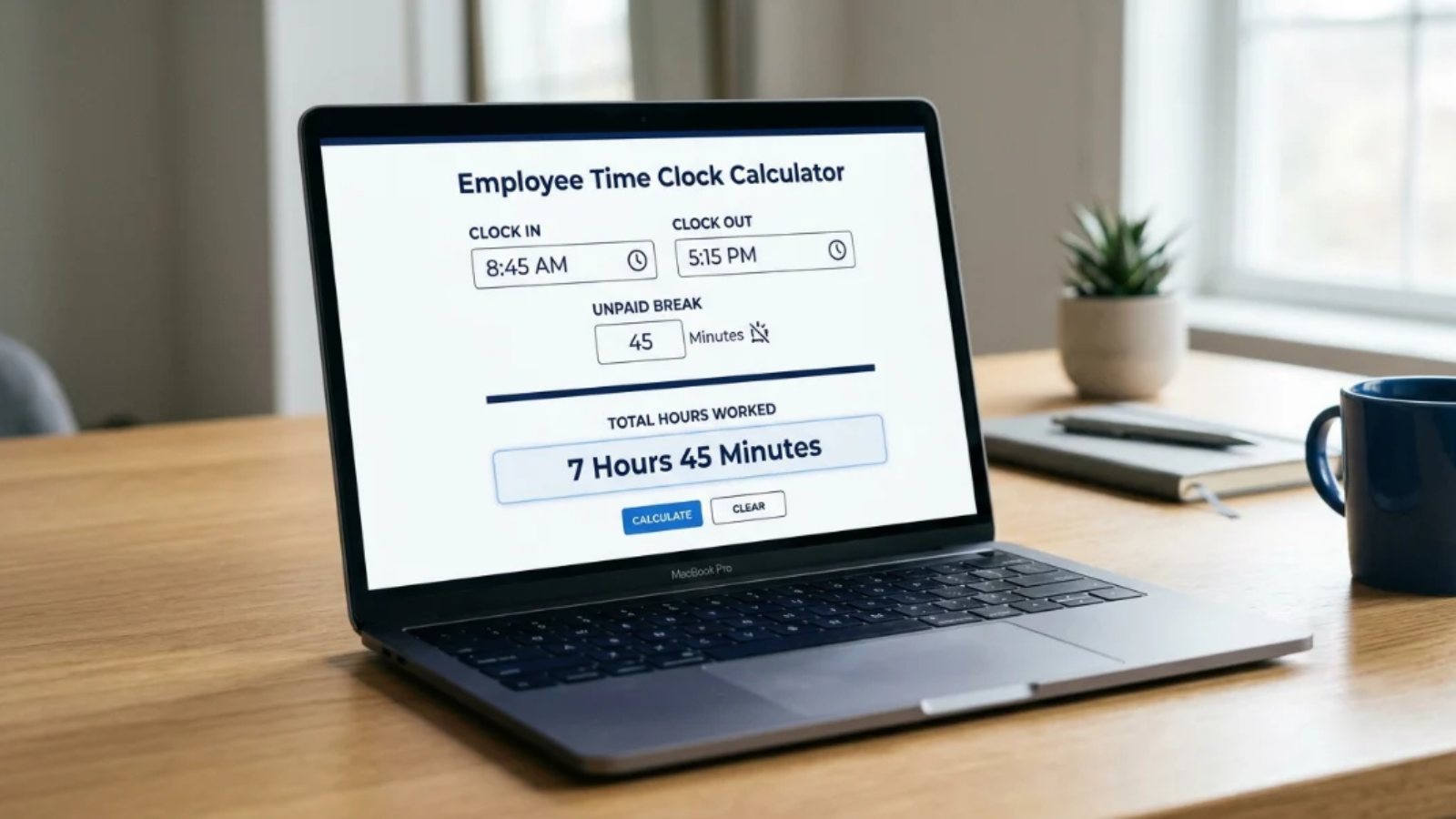
Consider an employee who clocks in at 8:45 AM and clocks out at 5:15 PM, with a 45-minute unpaid break.
The elapsed time is 8 hours and 30 minutes. After subtracting the break, the total working time is 7 hours and 45 minutes.
A calculator helps produce this result quickly, but the final record should still reflect the employee’s actual working hours and the organization’s timekeeping rules.
Time Clock Calculator vs. Manual Time Tracking
Manual time tracking is not automatically inaccurate. A well-maintained spreadsheet can calculate hours correctly when the formulas and entries are correct. The challenge is maintaining consistency as the volume of records increases.
Here is how the two approaches compare.
| Task | Manual calculation | Time clock calculator |
| Calculate daily working hours | Requires manual arithmetic or spreadsheet formulas | Calculates hours from entered times |
| Deduct unpaid breaks | Must be calculated separately or through a formula | Can deduct breaks when supported |
| Handle overnight shifts | Requires careful date and time calculations | Simplifies the calculation when overnight shifts are supported |
| Estimate overtime | Requires applying the relevant rules | May calculate overtime if configured for it |
| Review attendance records | Requires checking the original entries | Still requires checking the original entries |
| Prepare payroll | Totals must be transferred or processed separately | Provides calculated hours that can support payroll preparation |
The biggest advantage is convenience. A calculator can reduce repetitive arithmetic and make routine checks faster.
It is important, however, to understand what the tool actually does. A basic calculator will not necessarily store attendance histories, approve timesheets, apply every overtime rule, or transfer working hours directly into payroll software.
Businesses should select tools according to the complexity of their timekeeping requirements.
Also Read: –
What’s an Overtime Calculator & How To Use It Right?
Many Working Hours Year: 2026 Breakdown & Calculator
The Key Benefits of Using a Time Clock Calculator
More Consistent Working-Hour Calculations
When managers calculate working hours manually, different people may use different methods for handling breaks, overnight shifts, or decimal conversions.
A time clock calculator applies the same calculation method to every entry. This makes it easier to review records consistently, provided users enter the correct information and use the appropriate settings.
Less Time Spent on Routine Administrative Work
Calculating employee hours is repetitive. When HR teams must review dozens or hundreds of records, the time spent on basic arithmetic can take attention away from other responsibilities.
A calculator reduces that repetitive effort. Managers can spend more time investigating missing punches, reviewing unusual overtime, and resolving attendance discrepancies instead of calculating every duration from scratch.
Easier Overtime Estimation
Overtime calculations often begin with knowing how many hours an employee worked during a particular period.
For example, if an employee records 44 working hours in a week and their applicable standard threshold is 40 hours, the initial difference is four hours.
That does not automatically mean all four hours qualify for overtime pay under every employment arrangement. Businesses must apply the relevant legal requirements, employment terms, and overtime policies before determining payable overtime.
A calculator can help establish the working-hour total needed for that review.
Support for Payroll Preparation
Payroll depends on more than attendance alone, but working hours can be an important input for hourly employees, overtime calculations, and attendance-based adjustments.
Using a time clock calculator can help businesses prepare those figures before processing payroll. The final payroll calculation should also account for applicable pay rates, leave, holidays, deductions, and statutory requirements.
Understanding Clock Time Calculator and Hours Calculator Functions
People searching for a clock time calculator or an hours calculator may be trying to solve slightly different problems. Understanding these differences helps businesses choose the right tool for the task.
What Does a Clock Time Calculator Do?
A clock time calculator generally works with start and end times displayed on a clock.
For example, a manager may need to determine the duration between 7:45 AM and 4:15 PM. The elapsed time is eight hours and 30 minutes.
If the employee takes a 30-minute unpaid break, the working time becomes eight hours.
This type of calculation is useful for checking daily shifts, confirming attendance totals, and reviewing individual timesheet entries.
When Is an Hours Calculator Useful?
An hours calculator can be useful when businesses need to add or compare durations across several shifts.
Suppose an employee works:
- Monday: 8 hours
- Tuesday: 7 hours and 30 minutes
- Wednesday: 8 hours and 15 minutes
- Thursday: 8 hours
- Friday: 7 hours and 45 minutes
The total is 39 hours and 30 minutes.
Adding these durations manually can become confusing, especially when minutes must be carried over into additional hours. An hours calculator simplifies the arithmetic and helps managers establish the total for the period.
What Is the Calculator Time Clock Connection?
The term “calculator time clock” may refer to tools that combine clock-in and clock-out information with working-hour calculations.
Depending on the tool, users may be able to enter start times, end times, and breaks, then obtain a total for each shift.
Businesses should check whether a particular tool simply calculates durations or also records attendance. The distinction matters because calculating hours and verifying employee attendance are two separate tasks.
Common Time Clock Calculator Mistakes to Avoid
Even a reliable calculator cannot correct information that has been entered incorrectly. Businesses should watch out for these common mistakes.
- Selecting the wrong AM or PM setting
Entering 7:00 PM instead of 7:00 AM can significantly change the result. Always verify the time format before calculating.
- Forgetting unpaid breaks
If an employee takes an unpaid break but the duration is not entered, the calculator may overstate the working hours.
- Mishandling overnight shifts
A shift that begins before midnight and ends the next morning must account for the change of date. Use a calculator that supports overnight shifts.
- Confusing hours and decimal hours
Seven hours and 30 minutes equals 7.5 hours, not 7.30 hours. This distinction matters when entering hours into payroll spreadsheets or systems that use decimal values.
- Assuming every extra hour is payable overtime
Working-hour totals and overtime eligibility are not always the same. Check the applicable rules before finalizing overtime payments.
When Should Businesses Move Beyond a Basic Calculator?

A time clock calculator works well when the primary requirement is calculating hours from known start and end times. However, businesses with larger teams may need more than a standalone calculation tool.
Consider a company managing 100 employees across multiple departments. Employees may work different shifts, request leave, clock in from different locations, and submit timesheets for approval. Managers may also need to track attendance discrepancies and prepare monthly payroll.
A basic calculator can calculate individual working-hour totals, but it will not necessarily bring all these activities together.
This is where an integrated workforce management platform can help. Depending on its features, such a platform can connect attendance records with leave management, timesheet reviews, and payroll workflows. Instead of repeatedly entering information into separate tools, businesses can manage related processes in a more organized way.
For example, EMPCloud brings workforce management functions together, helping businesses manage attendance, leave, and payroll through a connected platform. For teams that have outgrown manual attendance calculations, this can be a practical next step.
The right choice depends on the business’s size, existing processes, and need for automation. A small team with straightforward schedules may only need a calculator, while a growing organization may benefit from a more comprehensive system.
EMPCloud: A Powerful Workforce Management Platform for Growing Businesses

A time clock calculator helps businesses calculate employee working hours, but managing a growing workforce involves much more than tracking time. EMPCloud is a comprehensive workforce management platform that brings together people, policies, workflows, and AI-powered tools in one place. Businesses can use it to manage attendance, leaves, payroll, employee productivity, and other essential operations without relying entirely on separate systems.
With 10 modules, 41 AI tools, and 250+ API endpoints, EMPCloud helps businesses simplify HR processes, improve operational visibility, and manage their workforce more efficiently as they grow.
Key EMPCloud Features for Better Workforce Management
- Attendance & Leave Management: Track employee attendance, manage leave requests, and maintain organized records through HRMS.
- Time Tracking & Productivity: Use EmpMonitor’s real-time productivity insights to understand work patterns and identify opportunities to improve efficiency.
- Payroll Management: Simplify employee payouts, tax management, and payroll-related compliance processes.
- Facial Recognition Attendance: Use EMP Biometrics to verify employee attendance and help reduce buddy punching.
- Field Force Management: Track field workforce locations and activities to improve coordination and operational visibility.
- AI-Powered Workforce Operations: Access workforce information, generate reports, and perform actions across connected HR modules using AI capabilities.
- Project Management: Organize tasks, monitor project progress, and coordinate teams using Gantt charts and Kanban boards.
By bringing these capabilities together, EMPCloud helps businesses move beyond basic time calculations and manage attendance, payroll, and wider workforce operations more effectively.
Ready to simplify workforce management? Book a quick demo → and explore its workforce management solutions.
Conclusion
Accurate time tracking is not just about knowing when employees arrive and leave. It also helps businesses maintain reliable timesheets, review overtime, prepare payroll figures, and resolve attendance discrepancies.
A time clock calculator makes one important part of this process easier by calculating working hours from clock-in times, clock-out times, and break durations. It can save time, reduce arithmetic errors, and help managers review employee hours more consistently.
Businesses should still verify attendance entries, account for overnight shifts, and apply the correct break and overtime policies. A calculator can simplify the mathematics, but accurate records and sound timekeeping procedures remain essential.
As workforce requirements become more complex in 2026, businesses should assess whether calculating hours individually is enough or whether they need an integrated system for attendance, leave, and payroll management.
The goal is simple: spend less time correcting time records and more time using reliable information to run the business effectively.
FAQs
Q1. What is a time clock calculator used for?
A time clock calculator determines the hours and minutes between an employee’s start and end times. Depending on its features, it can also deduct breaks, calculate overnight shifts, and help estimate overtime.
Q2. Can a time clock calculator help with payroll?
Yes. It can calculate working-hour totals that businesses use when preparing payroll. However, final wages may also depend on pay rates, overtime rules, leave, deductions, and other employment requirements.
Q3. How do I calculate working hours with unpaid breaks?
Enter the employee’s clock-in and clock-out times, then subtract the unpaid break duration. For example, an 8:00 AM to 5:00 PM shift with a one-hour unpaid break equals eight working hours.
Q4. What is the difference between a time clock calculator and an hours calculator?
A time clock calculator commonly calculates the duration between clock-in and clock-out times. An hours calculator can also be used to add multiple durations or determine the total hours worked over several shifts. Features vary by tool.
Q5. Can businesses use a time clock calculator to track employee attendance automatically?
Not necessarily. A standalone calculator works with the information entered by the user. Automatic attendance tracking generally requires a timekeeping system that records employee clock-ins and clock-outs and maintains those records.
Quick Search Our Blogs
Type in keywords and get instant access to related blog posts.

