
You Don’t Have a Tools Problem
Remote collaboration tools are everywhere now. A quick search gives you hundreds of options promising faster communication, smoother workflows, and better productivity. Yet many teams still struggle with missed updates, duplicate work, and endless meetings.
That’s usually the first sign the issue isn’t the tools themselves.
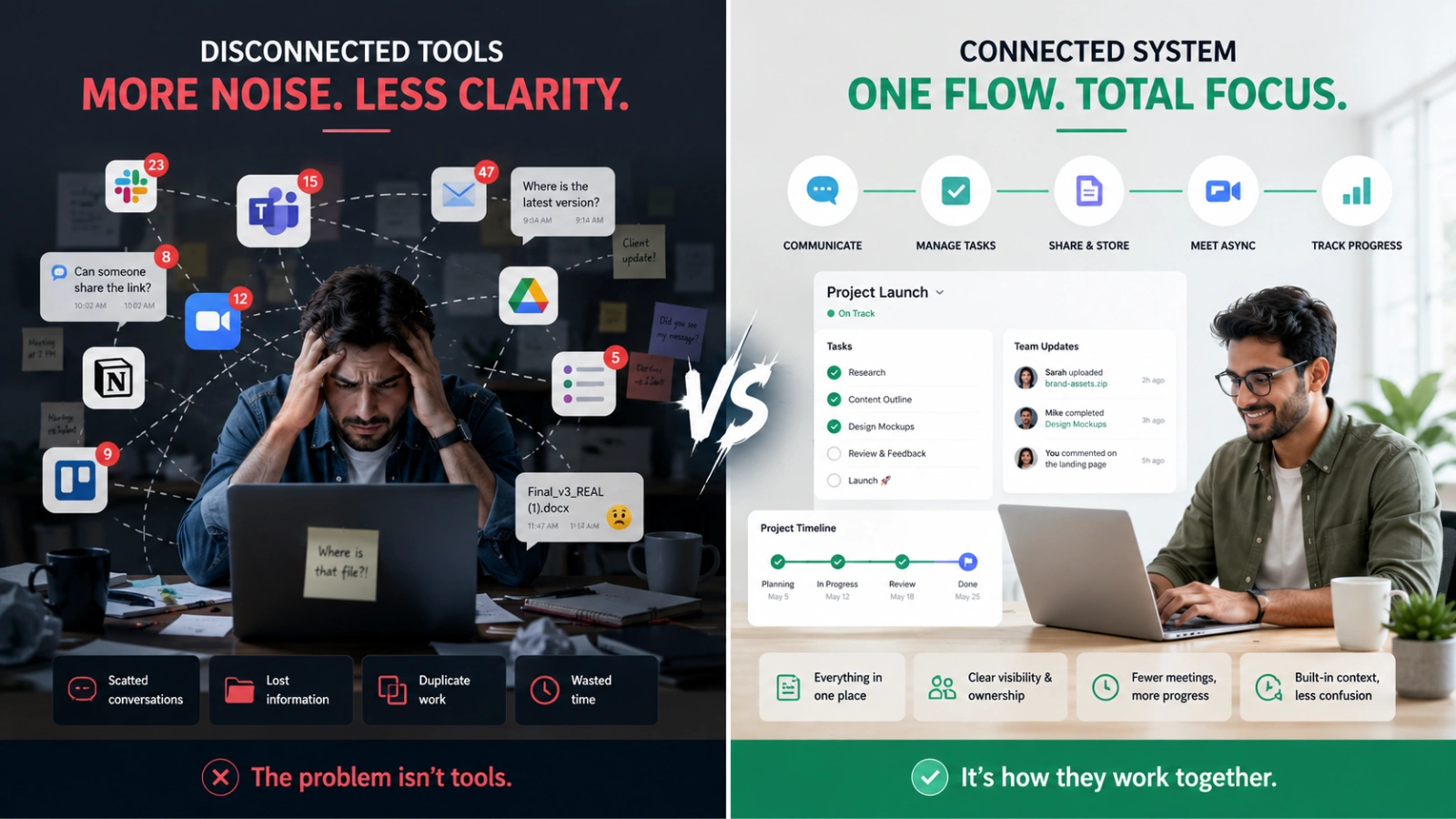
Most remote teams don’t fail because they picked a “bad” platform. They fail because they built a disconnected system around unclear workflows. One app handles messaging, another stores documents, and a third tracks tasks, and none of them work together naturally.
The result feels familiar. Important decisions disappear inside chat threads. Team members ask the same questions repeatedly. Managers spend more time coordinating work than moving it forward.
What makes this harder is that modern team collaboration tools all sound similar on the surface. Every platform claims to improve productivity. Every homepage promises seamless collaboration. Very few explain when a tool actually fits your team.
That’s the real challenge.
The best remote teams in 2026 are not constantly switching between the top remote collaboration tools 2026 articles recommend. They’re becoming far more intentional about the tools they keep. They’re becoming far more intentional about the tools they keep. Instead of chasing trends, they focus on reducing friction, improving visibility, and simplifying how work gets done.
This guide takes that approach. Rather than giving you another overwhelming list of remote work collaboration tools, it will help you understand how to evaluate them based on how your team actually works.
What Makes a Remote Collaboration Tool “Best”?
The best remote collaboration tools solve a specific workflow problem, fit your team’s communication style, and integrate cleanly with the systems you already use. The goal is not to find the platform with the most features. It’s to find the one your team will consistently use without adding complexity.
Here’s what matters most:
- Your team’s work style: async, real-time, or hybrid
- Integration with your existing workflow and software stack
- Ease of adoption across departments and experience levels
A tool that looks impressive during a demo can still become a daily frustration if it doesn’t match how people naturally collaborate.
Read Aloud!
First, Understand the 5 Categories of Remote Collaboration Tools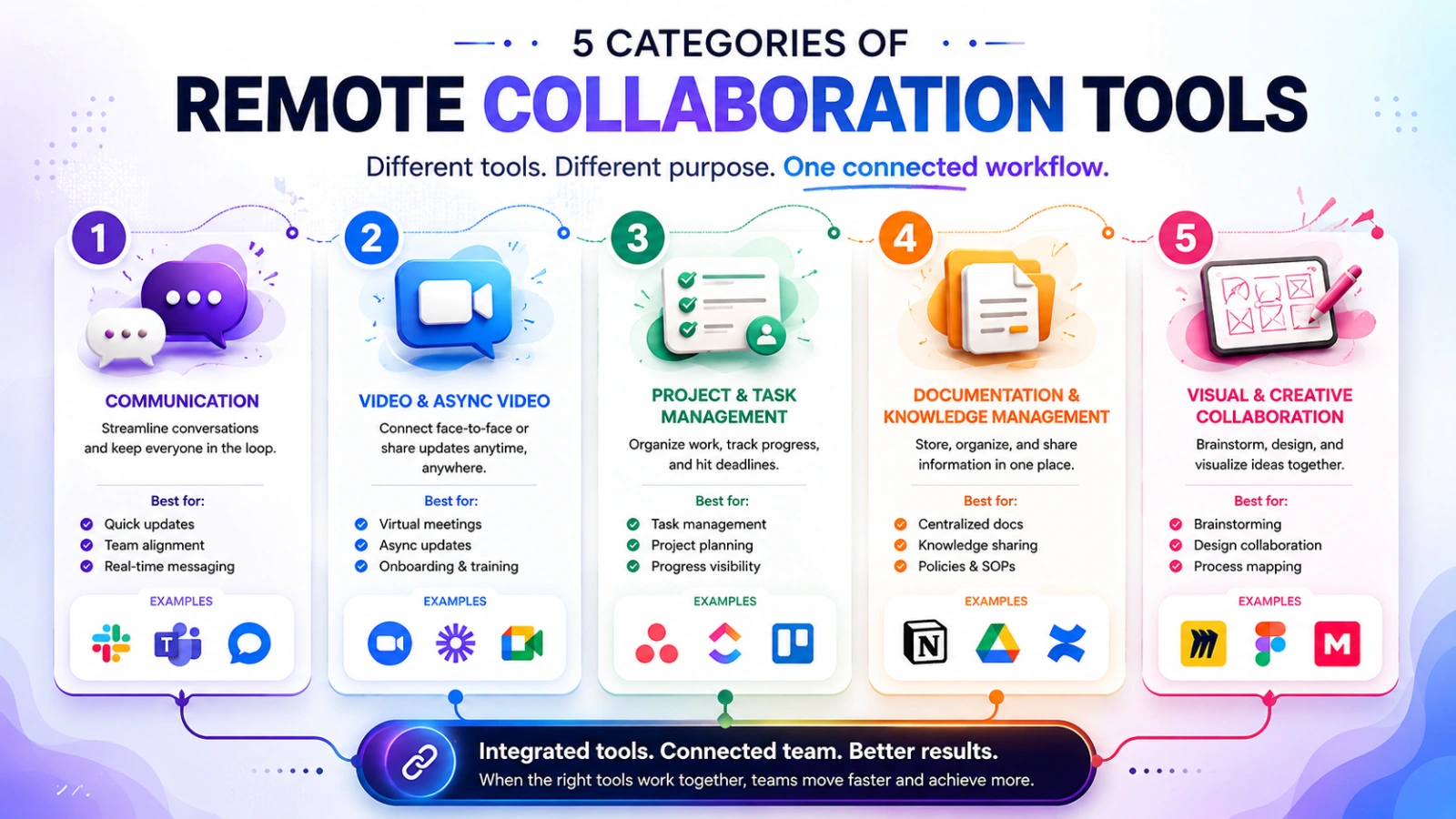
Many companies make the same mistake early in the evaluation process. They compare products before understanding what category of problem they’re trying to solve.
That creates confusion fast.
Different remote team collaboration tools serve completely different purposes. Some improve communication. Others organize projects. Some reduce meetings entirely.
Once you understand the categories, choosing becomes much easier.
Communication Tools (Real-Time Messaging)
These tools replace scattered email chains and make conversations easier to organize.
They work best for:
- Fast-moving teams
- Customer-facing departments
- Daily coordination
- Quick approvals and updates
Good communication platforms reduce delays. They also create transparency across departments. Instead of private conversations happening everywhere, discussions become visible and searchable.
Still, there’s a tradeoff.
Too many real-time notifications can destroy focus. Teams often mistake constant responsiveness for productivity. That’s one reason many companies are rethinking how they use messaging apps.
When evaluating communication-focused remote collaboration tools, pay attention to:
- Channel organization
- Search functionality
- Notification controls
- File sharing
- Integration support
A messaging tool should simplify communication, not create digital noise.
Video Conferencing and Async Video
For years, remote work revolved around meetings. Then teams began to realize something uncomfortable: many meetings weren’t necessary in the first place.
That shift changed how remote work collaboration tools evolved.
Live video meetings still matter for brainstorming, onboarding, and relationship-building. But modern remote collaboration tools are increasingly supporting async video, especially for distributed teams working across time zones.
Instead of scheduling another call, employees can:
- Record walkthroughs
- Explain feedback visually
- Share updates asynchronously
- Reduce meeting fatigue
This approach gives people more control over their workday while preserving context.
The key question is simple: Does your team genuinely need instant discussion, or are meetings filling gaps caused by poor documentation?
That answer changes which remote work collaboration tools make the most sense for your team.
Project and Task Management Tools
Without visibility, remote work becomes reactive.
Project management platforms bring structure to remote collaboration tools by helping teams track ownership, deadlines, priorities, and progress in one place. More importantly, they reduce the mental overhead of constantly asking for updates.
Strong team collaboration tools in this category help answer questions like:
- What needs attention right now?
- Who owns this task?
- What’s blocked?
- What changed this week?
The best systems feel lightweight enough for daily use but structured enough to prevent confusion.
A common mistake is choosing overly complex software too early. Startups often adopt enterprise-level remote work collaboration tools packed with features they rarely use. Adoption drops quickly when a tool feels harder than the work itself.
Look for simplicity first. Complexity can come later if needed.
Document and Knowledge Collaboration
A shared drive is not a knowledge system. That realization hits most growing remote teams eventually. Files get uploaded, renamed, duplicated, and forgotten. New employees struggle to find answers, while teams rely on coworkers instead of finding information independently.
Knowledge collaboration tools are an essential part of modern remote collaboration tools because they create living documentation instead of passive file storage.
Instead of simply storing files, they help teams:
- Document decisions
- Build internal processes
- Create searchable knowledge bases
- Collaborate on documents in real time
This becomes especially valuable for async-first companies.
When information is easy to find, communication becomes more intentional. Teams ask better questions because context already exists.
One overlooked benefit is onboarding speed. Well-documented organizations scale faster because knowledge stays inside systems, not inside individual employees’ heads.
Visual Collaboration Tools
Some ideas are difficult to explain through text alone.
Visual collaboration platforms help teams brainstorm, map workflows, and think spatially. They’re especially useful for:
- Product teams
- Designers
- Strategy workshops
- Process planning
- Remote brainstorming sessions
A visual whiteboard often reveals gaps that long chat threads never expose.
These tools became much more important once distributed work became permanent. Teams needed ways to recreate the spontaneity of in-person collaboration without sitting in the same room.
Still, not every company needs them daily.
That’s why understanding your actual workflow matters more than copying another company’s stack.
Questions You Must Answer Before Choosing Any Tool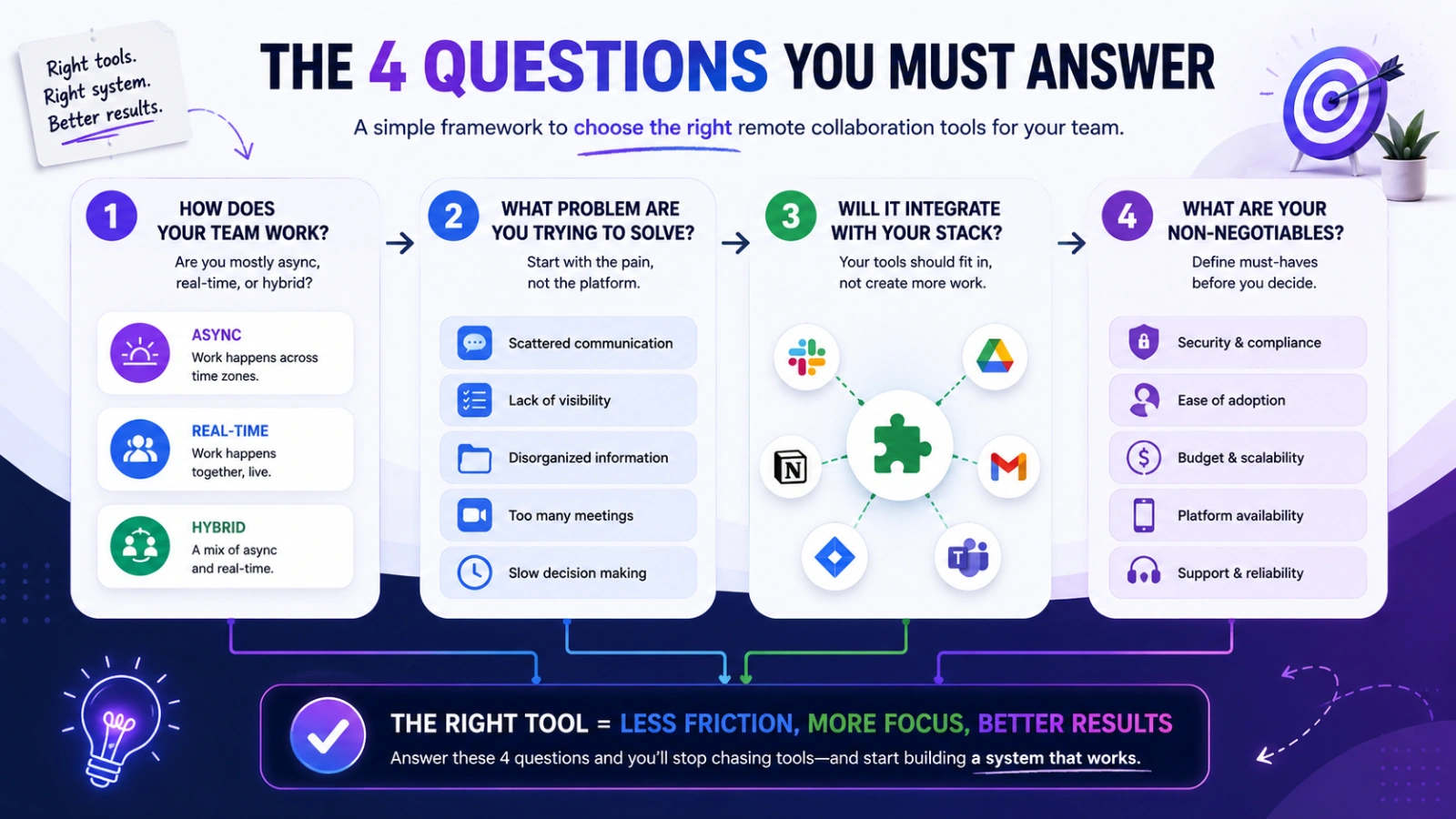
This is where most articles stop being useful.
They compare features, pricing, and popularity. What they rarely explain is how to decide which remote collaboration tools fit your environment.
That decision becomes easier when you ask four specific questions first.
Is Your Team Primarily Async or Real-Time?
This single question eliminates half your options immediately.
Teams using async-friendly remote collaboration tools prioritize flexibility. People respond thoughtfully instead of instantly. Documentation matters more, and communication happens across time zones without expecting everyone to be online together.
Real-time teams operate differently. Decisions happen quickly, collaboration is immediate, and fast feedback loops matter more than delayed responses.
Neither model is automatically better.
A global software company with employees in multiple countries will likely lean async. A sales team handling live customer communication may need real-time responsiveness.
Problems start when the tool stack fights the workflow.
For example, an async-first company overloaded with chat-heavy team collaboration tools often creates pressure for constant availability. That defeats the purpose of async work entirely.
The right remote work collaboration tools should support your operating style, not reshape it unintentionally.
What’s Actually Broken in Your Current Workflow?
Many companies buy software before identifying the real problem.
That usually leads to overlap and frustration.
Take a closer look at where work breaks down today:
- Are deadlines unclear?
- Do employees miss updates?
- Is information scattered?
- Are meetings replacing documentation?
- Are teams duplicating work?
The answer points toward the category you should prioritize.
If visibility is the issue, project management may matter more than messaging. If decisions disappear after meetings, documentation tools become critical.
This sounds obvious, yet many businesses skip it entirely. They adopt top remote collaboration tools because competitors use them, not because they solve a defined operational problem.
Good decisions start with clarity, not trend-following.
Does the Tool Fit Your Existing Stack?
A powerful tool can still become a bad investment if it creates friction elsewhere.
Integration matters more than most companies expect.
Your communication platform, project system, calendar, storage tools, and HR software should work together naturally. Otherwise, employees waste time switching between systems and manually updating information.
That’s where tool sprawl begins.
For example, companies heavily invested in Microsoft 365 often benefit from tools designed around that ecosystem. Teams centered around Google Workspace may need different priorities entirely.
Ask practical questions early:
- Does it integrate natively?
- Will teams need workarounds?
- Can information sync automatically?
- Will adoption feel seamless?
The smoother the connection, the more likely employees are to actually use the system consistently.
What Are Your Non-Negotiables?
Every organization has different operational realities.
A startup may prioritize speed and affordability. An enterprise handling sensitive customer data may focus heavily on compliance and security.
Remote collaboration tools should match those priorities directly.
Some factors become essential depending on the business:
- SOC 2 compliance
- GDPR support
- Mobile accessibility
- Scalability
- Admin controls
- Permission management
Ignoring these details early often creates migration headaches later.
Simple tools are attractive at first. But if they can’t scale with your workflow, your team eventually outgrows them.
The best choice is rarely the most feature-heavy platform. It’s the one that fits your current operations while still supporting future growth.
Also Read:
Where EmpCloud Fits Into Your Remote Collaboration System
The best remote collaboration tools do more than improve communication. They also help teams manage productivity, projects, attendance, and daily operations without creating extra complexity.
EmpCloud supports remote and hybrid teams by combining workforce management and collaboration features in one platform. Instead of using separate systems for HR, attendance, and task tracking, teams can manage everything centrally.
Key EmpCloud features include:
- Time tracking and productivity monitoring
- Attendance and leave management
- Project and task tracking
- Employee onboarding and document management
- Real-time reports and analytics
- Mobile access for remote teams
- Role-based access controls
This makes EmpCloud especially useful for remote-first companies, startups, HR leaders, and distributed teams looking to reduce tool sprawl while improving visibility and coordination.
Choose What Fits Your Team
The best remote collaboration tools are not the ones with the most features. They’re the ones that fit your team’s workflow, reduce friction, and make communication easier.
Instead of adding more software, focus on building a simple, connected system for communication, task management, and knowledge sharing. A smaller, well-integrated stack often works better than a collection of disconnected tools.
Before choosing any remote team collaboration tools, identify where your current workflow breaks down, test a few options with your team, and prioritize adoption over popularity. The right tool should make work feel clearer, faster, and less stressful every day.
FAQs
What are remote collaboration tools?
Remote collaboration tools help distributed teams communicate, manage projects, share files, and work together from different locations.
How many collaboration tools does a remote team need?
Most teams work efficiently with 2–4 core remote collaboration tools covering communication, task management, and document sharing.
What is the difference between collaboration tools and project management tools?
Collaboration tools focus on communication and teamwork, while project management tools organize tasks, deadlines, and workflows.
Are free remote collaboration tools good enough for small teams?
Yes, many free tools work well for startups and small teams, though paid plans usually offer better integrations, storage, and admin controls.
How do I choose the best remote collaboration tools?
Choose tools based on your team’s workflow, communication style, integrations, scalability, and ease of adoption rather than popularity alone.
Quick Search Our Blogs
Type in keywords and get instant access to related blog posts.

