
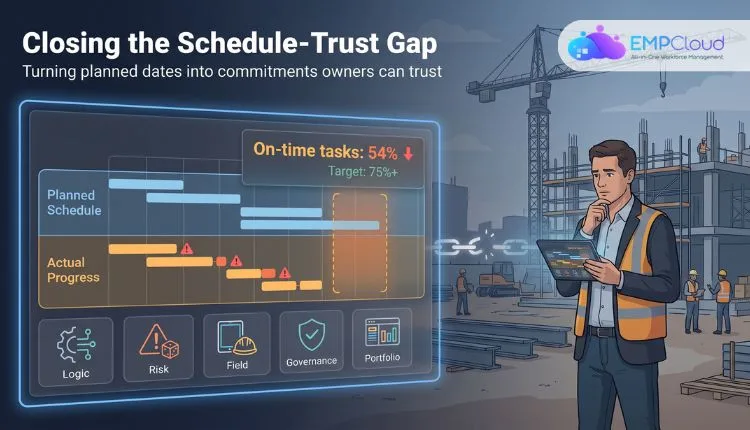
Construction schedules read like certainties on paper, but crews experience another reality. According to the Lean Construction Institute, only 54 percent of promised tasks finish on time—even elite teams rarely top 75 percent. That shortfall—what we call the schedule-trust gap—threatens cost, safety, and public credibility. If you’re a capital-project owner, closing it matters. This guide defines what a reliable schedule looks like, shares an owner-centric scoring method, and ranks six enterprise-grade tools so you can choose the platform that turns projected dates into trusted commitments.
The best schedule-reliability tools at a glance
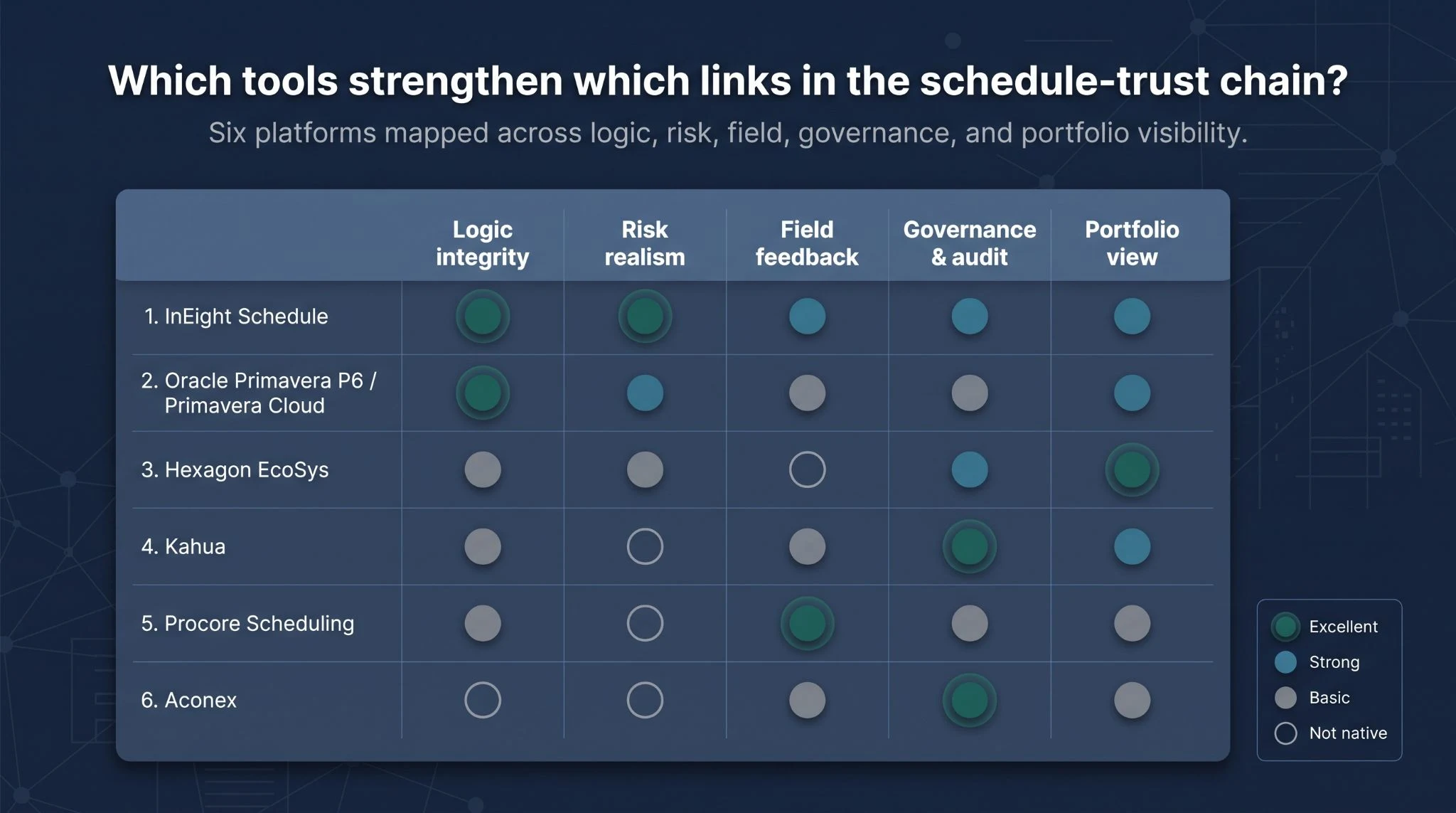
Before we compare each platform in detail, here’s the quick read. The table below maps every tool to the five links in the schedule-trust chain (logic, risk, field feedback, governance, and portfolio visibility) so you can spot which gap matters most to you. Ratings use plain language (Excellent, Strong, Basic, Not native). Pricing is “custom quote” unless noted otherwise.
| Rank | Tool | Primary role | Best for | CPM depth | Risk realism | Field feedback | Governance & audit | Portfolio view | Integration depth | Pricing status | Main limitation |
| 1 | InEight Schedule | Integrated CPM + controls | Balanced owner reliability | Excellent | Excellent | Strong | Strong | Strong | Excellent | Custom quote | Needs live test for P6 round-tripping |
| 2 | Oracle Primavera P6 / Primavera Cloud | Specialist CPM engine | Contracts that require P6/XER | Excellent | Strong* | Basic | Basic | Strong | Strong | Quote-based; desktop licence often listed as an estimated USD 3 000–4 000 | Steep learning curve; modular stack |
| 3 | Hexagon EcoSys | Portfolio project controls | Cross-project cost-schedule governance | Basic (import) | Basic | Not native | Strong | Excellent | Strong | Custom quote | Relies on external CPM editor |
| 4 | Kahua | Owner CDE / workflow | Configurable public-owner governance | Basic | Not native | Basic | Excellent | Strong | Strong | Custom quote | Limited native risk modelling |
| 5 | Procore Scheduling | Field-centric platform | Contractor adoption; connected project data | Basic | Not native | Excellent | Basic | Basic | Strong | Custom quote | New CPM module; verify baselines |
| 6 | Aconex | Common data environment | Audit trail of schedule-affecting documents | Not native | Not native | Basic | Excellent | Basic | Excellent | Custom quote | Needs separate CPM and risk tools |
- Primavera Cloud includes Monte Carlo simulation and risk registers; desktop P6 requires add-ons.
Use the matrix to start the right vendor conversation. Need stronger logic? Look for Excellent under “CPM depth.” Fighting stale field data? Focus on “Field feedback.” The next section defines what “reliable” really means before we examine each product one by one.
What actually makes a construction schedule reliable?
A schedule must be comprehensive, well-constructed, credible, and controlled
The U.S. Government Accountability Office (GAO) measures schedule quality against four traits: comprehensive, well-constructed, credible, and controlled. Lose any one of them, and auditors won’t trust the timeline.
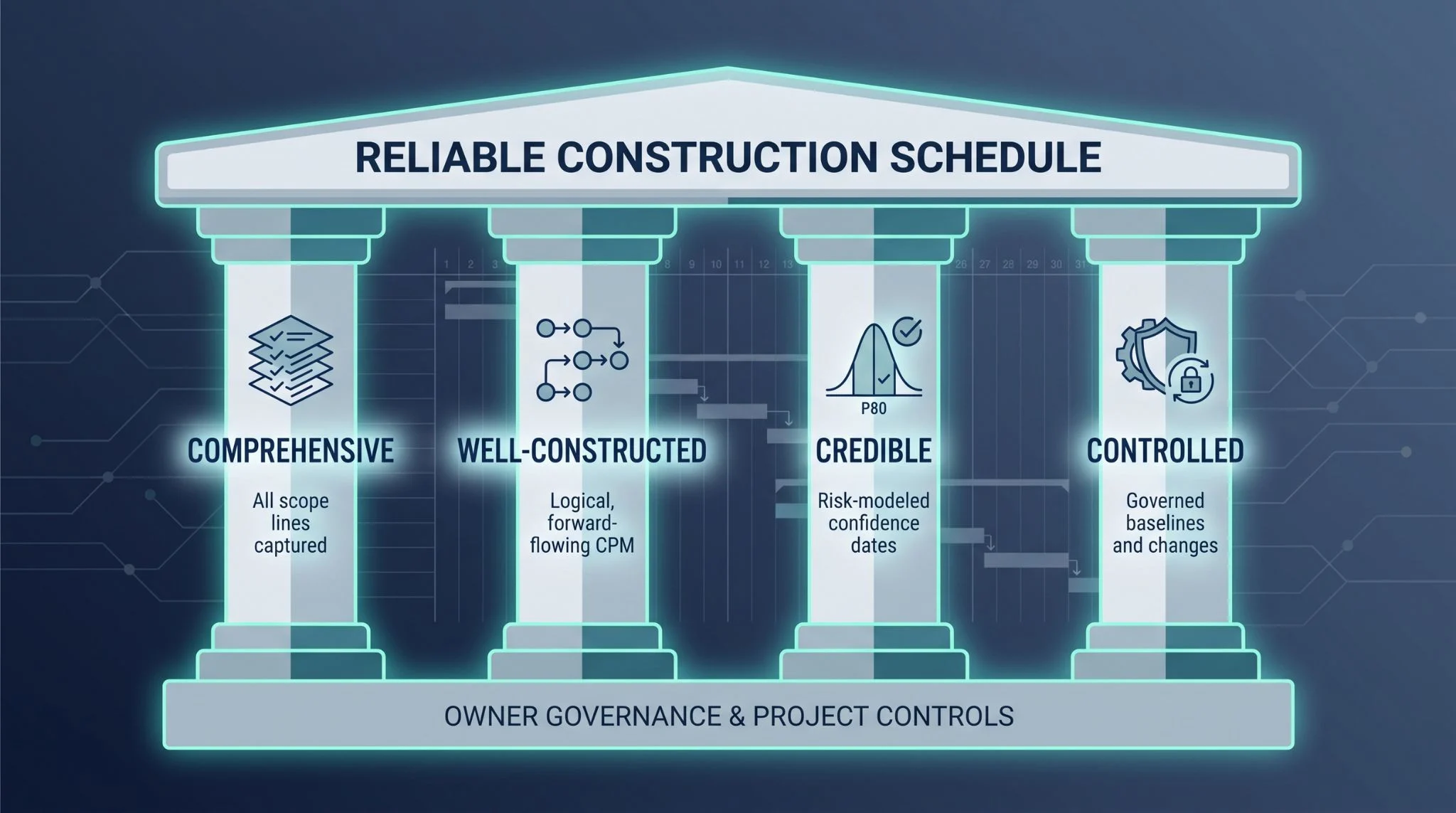
- Comprehensive means every scope line (owner work, contractor activities, and long-lead procurement) lives inside one logical network. Anything omitted hides off the critical path and can blindside the team.
- Well-constructed focuses on logic quality: aligned calendars, forward-flowing relationships, and zero open ends or unrealistic lags. Sound logic is the foundation for any risk model.
- Credible shifts to risk realism. Durations rely on historical data, three-point estimates feed Monte Carlo simulations, and teams plan to a P80 confidence date, not an optimistic guess.
- Controlled covers governance in practice. Baselines lock, every change is time-stamped and reason-coded, and updates follow a disciplined cadence that keeps disputes out of status meetings.
These four pillars guide the scoring that follows; the highest-ranking tools strengthen at least two and, ideally, all four.
The five links in the schedule-trust chain
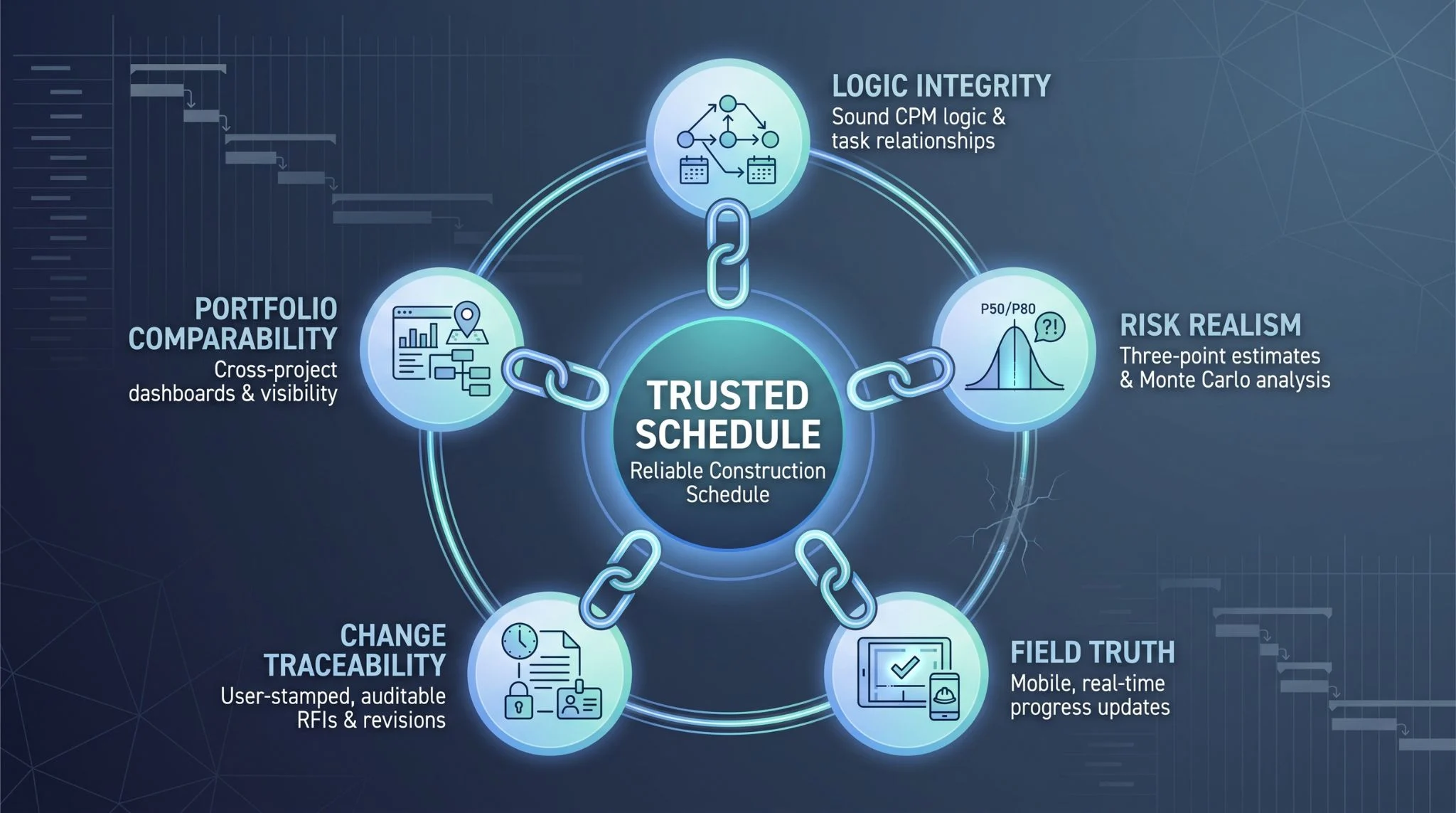
A reliable schedule rests on five evidence points. If any link breaks, confidence drops.
Logic integrity. Activities flow one way, calendars match the contract, and every task has both a predecessor and a successor. Open ends or long lags make later risk analysis meaningless.
Risk realism. Single-point durations become three-point estimates, and discrete threats feed Monte Carlo simulations. Owners who track P50 and P80 dates spot trouble months sooner.
Field truth. Mobile progress capture, look-ahead plans, and constraint logs push real production data into the master file, closing the gap between assumed and actual.
Change traceability. Every logic tweak, RFI, design revision, or procurement slip carries a user, date, and reason code. A clean audit trail ends the “who moved my milestone?” debate.
Portfolio comparability. Even when EPCs use different codes, owners need one dashboard that highlights which span, substation, or station is drifting. Normalised calendars and health metrics let executives steer the whole capital program.
Our scoring asks a simple question: which of these links does each platform strengthen out of the box, and where will you still rely on spreadsheets or plug-ins?
How we scored the tools
Buying on brand name alone brings buyer’s remorse, so we built an eight-factor yardstick that mirrors the headaches capital-project owners face every reporting cycle.
Logic and risk carry the most weight. If the CPM engine is weak or the risk model is cosmetic, no dashboard can protect the project. AACE Monte Carlo guidance shows why confidence dates, criticality indices, and tornado charts matter for setting contingencies and surfacing true delay drivers.
Governance, field truth, and portfolio visibility take nearly half of what’s left. Owners juggle many contractors; if a platform can’t lock baselines, track logic changes, and pull look-ahead data into the master file, you’re back to reconciling PDFs at midnight.
Scorecard weighting
- Technical CPM depth – 18 percent
- Quantitative risk realism – 18 percent
- Owner-contractor governance & audit trail – 16 percent
- Field-to-master feedback – 14 percent
- Portfolio comparability – 12 percent
- Integrated cost / document / field data – 10 percent
- Usability & adoption – 7 percent
- Commercial fit & pricing clarity – 5 percent
Each criterion is rated from zero to five. Tie-breakers favor stronger governance, then deeper risk. Any product that failed to strengthen at least two links in the schedule-trust chain never reached the comparison table.
With the ground rules set, let’s see how each contender performs.
1. InEight Schedule – best overall for owner-side schedule reliability
InEight tops our list because it strengthens every link in the schedule-trust chain without forcing you to juggle separate apps. Its CPM engine imports and exports P6 files, InEight Risk runs native Monte Carlo simulation, and the look-ahead planner feeds field updates straight into the master schedule. You can learn more about these workflows on the product page.
Who it’s best for
Owners running multi-EPC capital programs—utilities adding transmission lines, transportation agencies rebuilding interchanges, or renewable developers racing grid-connection dates—gain the most from:
- Collaborative CPM authoring that lets owner reps, contractors, and specialists review logic before the baseline locks
- Integrated risk workshops where three-point estimates and discrete threats live in the same database as activity durations
- Live look-ahead planning that aligns weekly crew commitments with the contractual critical path
Because InEight Schedule sits inside a unified platform that brings estimate, schedule, cost, document, risk, and field data into one suite, portfolio teams see cross-project dashboards without exporting to another warehouse. That single-source design is why the tool scores Excellent or Strong on every criterion in our table.
Why it closes more links in the trust chain
- Logic and risk. Build the CPM model; the risk register sits beside it. Run Monte Carlo, and the P80 finish date appears on the same Gantt view the contractor updates.
- Field truth. Superintendents log quantities on a tablet; remaining durations refresh before Monday’s stand-up.
- Governance. Baselines freeze, logic edits route for approval, and every change is time-stamped and user-stamped.
- Portfolio comparability. Shared calendars and codes roll up automatically, giving executives one dashboard, not a quilt of mismatched reports.
Where buyers should probe during the demo
- File fidelity. Import a complex P6 XER, export it back, and confirm no relationships, calendars, or codes are lost.
- Risk realism. Load three-point estimates plus discrete threats, run Monte Carlo, and view the tornado chart and P80 finish on one screen.
- Field feedback. Mark tasks complete on a tablet while offline, sync, and confirm float adjusts instantly.
- Integrations and pricing. Check bidirectional ERP and BIM APIs, and clarify licence boundaries (named users, project count, environments).
Pricing and 2025–2026 roadmap
Like every enterprise platform on this list, InEight is priced by quote, so the package matches your program’s users, projects, and service needs. The platform is built for portfolio scale: InEight software has supported more than one trillion dollars in capital projects across its customer base. It also applies AI to historical project data to flag schedule risks early and suggest mitigation options, which strengthens the risk-realism link without replacing the scheduler.
Proof from the field
Pattern Energy uses InEight Schedule to manage more than 80,000 schedule activities on its SunZia wind and transmission program, one of the largest clean-energy infrastructure projects in the United States.
2. Oracle Primavera P6 / Primavera Cloud – best for specialist CPM depth
Who it’s best for
When contract language still spells “schedule” as P6/XER, Primavera is the default. Government infrastructure, nuclear refurbishments, and mega-industrial builds often mandate P6 files, and seasoned schedulers count on its deep relationship types, multiple calendars, and resource-leveling power refined over thirty years.
Primavera also serves owners with in-house scheduling teams who treat float scientifically, balancing crane time, managing simultaneous shutdown windows, and squeezing negative float back to zero without breaking logic. If downstream tools such as claim-analysis systems or state portals already expect a P6 file, sticking with the native format avoids conversion fights later.
Reliability strengths
- Deep CPM engine. A 25 000-line refinery turnaround still scrolls smoothly, and complex links—start-to-start with negative lag—keep float accurate.
- Native risk in Primavera Cloud. Three-point estimates, discrete threats, Monte Carlo, and outputs such as confidence curves and tornado charts live in the same browser view. The 26.6 release added refined risk dashboards and activity management.
- Portfolio transparency. Cross-project milestones and baselines roll into owner dashboards without forcing every contractor onto identical WBS codes.
- Ecosystem connectors. Most major ERP, document, and field platforms ship a P6 integration, reducing custom-API fatigue.
Know the product flavors
- P6 Professional – desktop workhorse for heavy editing and offline crunching.
- P6 EPPM – web layer on the same database, adding portfolio views and workflows.
- Primavera Cloud – separate SaaS edition with the same CPM depth plus built-in risk and task modules.
Confirm which edition each stakeholder will run before you price licences or write spec language; features, integrations, and costs differ.
Limitations and demo checkpoints
Power costs time. The interface feels like engineering software, casual users often default to PDFs, and implementation can take months. Risk and field feedback split across editions; desktop P6 needs an add-on, while Cloud field capture is lighter than dedicated mobile tools.
Demo four things:
- Import stress. Load a complex XER, verify no lost calendars or baselines, then export it unchanged.
- Risk handshake. For desktop, watch the Monte Carlo add-on live; for Cloud, run a risk workshop on your own file.
- Field update loop. Make a mobile change and trace float movement in real time.
- Portfolio roll-up. Merge two differently coded contractor schedules and show one milestone-variance dashboard with no manual mapping.
Pass these and Primavera earns its keep; miss any and you’ll be stitching spreadsheets for years.
3. Hexagon EcoSys — best for portfolio project controls
Who it’s best for
Owners who already receive contractor CPM files but struggle to connect cost, forecast, and schedule risk across dozens of projects. Transportation agencies, mining majors, and industrial owners use EcoSys to pull cost curves, forecast changes, and milestone variance into one governed hub.
Reliability strengths
- Portfolio lens, not CPM replacement. Import P6 or InEight schedules, align them to a common coding dictionary, and see which milestones threaten cash flow or resource capacity.
- Cost and schedule in one database. Budget changes, forecast shifts, and baseline moves route through configurable approvals, preserving the audit trail finance teams need. Contingency draws appear next to float erosion—no more planner-vs-cost-engineer blame games.
- Executive dashboards. Risk-adjusted finish dates roll up beside earned-value curves, so leadership sees exposure before it hits headlines.
Limitations and demo focus
EcoSys offers light CPM editing; heavy logic changes still live in P6 or InEight, and daily field quantities require an external feed. In the demo, import two contractor schedules with different WBS and calendars, map them to a common structure, then change a forecasted cost and watch the risk heat map update. Instant change proves you have a portfolio command center; a trip to Excel means keep shopping.
4. Kahua — best for configurable public-owner governance
Who it’s best for
Public owners that need a common data environment with strong workflow controls. Transportation departments, higher-education systems, and municipal agencies pick Kahua when audit rules and custom forms carry as much weight as Gantt charts.
Reliability strengths
- Governance first. Configurable workflows, approvals, and audit trails align with public-sector policies out of the box.
- Integrated forms. RFIs, change orders, and pay apps live beside the schedule, so each date shift links to a documented cause.
- Portfolio oversight. Dashboards roll project health, risk flags, and budget status into executive views without extra mapping.
Limitations and demo focus
Kahua relies on imported CPM files for deep logic and offers limited native risk modelling. In the demo, import a contractor schedule, lock an owner baseline, then route a logic change through your approval chain. Verify the audit log captures user, time, and reason. If that loop feels seamless, Kahua can serve as the governance backbone while external CPM and risk tools handle the math.
5. Procore Scheduling — best for field adoption and contractor collaboration
Who it’s best for
When most of your general contractors and subs already run Procore, adding the Scheduling module turns passive Gantt viewing into live field collaboration. Owners of commercial airports, data centers, and design-build highways choose it because progress data comes straight from crews, not a week-old email thread.
Reliability strengths
- Proximity to the field. Crews log quantities, photos, and issues in the same app that houses the master schedule, tightening the loop between an RFI answer in the trailer and a logic shift in the CPM.
- Native schedule authoring. Procore launched full schedule creation in October 2025, so planners can build or edit tasks without exporting to P6 or Microsoft Project first.
- Linked context. Drawings, RFIs, and submittals live in one platform; clicking an activity reveals the document or discussion that drove the resequence.
Limitations and demo focus
Procore’s CPM depth trails Primavera or InEight. Relationship types, multiple baselines, and resource leveling exist, but complex links (negative lags, mixed calendars) need testing, and there’s no native Monte Carlo risk. Owners who need probabilistic dates still export to a specialist tool.
In the demo, insist on three proofs:
- Baseline management. Create a baseline, change logic, and see variance instantly.
- P6/XER fidelity. Import a complex contractor schedule, export it unchanged, and verify calendars, constraints, and codes survive the round-trip.
- Field update loop. Mark tasks complete on a tablet, sync, and confirm float adjusts within minutes.
If those workflows run smoothly, Procore can turn field activity into schedule truth instead of guesswork.
6. Aconex — best for auditability around schedule changes
Who it’s best for
Megaprojects often slip because design decisions, RFIs, and approvals crawl, not because the critical path math is wrong. Rail corridors, hospital campuses, and cross-border pipelines use Aconex to trace every date shift back to a source document.
Reliability strengths
- Single record of truth. Drawings, model revisions, and correspondence live in one controlled mailbox. A late design change updates the linked activity’s dates, and you can click straight to the email thread and revised sheet that caused the slip.
- Role-based access. Each party keeps a private workspace yet must publish approved records to the project view. Immutable audit logs show who opened, downloaded, or marked up a file—handy for public-disclosure rules.
- Tight schedule links. Integrations with Primavera and InEight let you attach documents and RFIs to activities without duplicating data, creating a chain from design change to float erosion that stands up in mediation.
Limitations and demo focus
Aconex will not build or risk-load your CPM. Treat it as the change-traceability layer and keep your existing scheduler for logic and Monte Carlo.
In the demo, insist on two proofs:
- Document-to-schedule link. Upload a revised spec, link it to an activity, and watch the schedule viewer highlight the impact.
- Cross-organization audit. Log in as a contractor, submit an RFI, then switch to the owner view and approve it. Timestamps, version numbers, and reply chains should be immutable.
If those workflows are airtight, Aconex will keep your schedule honest even when the paperwork pile grows.
The best CPM engine is not automatically the best reliability platform
Brilliant logic alone can’t guarantee a believable finish date. Primavera delivers deep CPM, yet owners still juggle spreadsheets when field updates live in another app and RFIs sit in inboxes. InEight ranks first because it combines logic with risk, field progress, and governed change, with no CSV exports required.
Reliability lives where disciplines meet. A pristine critical path loses value the moment an unanswered submittal or procurement hold goes untracked. A document-rich platform that lacks schedule math can’t warn you about float erosion until it’s too late.
When you evaluate tools, resist crowning whichever has the most scheduling features or the slickest mobile screen. Instead, trace each link of the trust chain—logic integrity, risk realism, field truth, change traceability, and portfolio comparability—then choose the platform that closes your biggest gap. The right answer is rarely about CPM muscle alone.
Imports are not integrations
Drag-and-drop feels painless until your team re-imports files three times a week. A one-way upload copies data once; a true integration keeps both systems in sync. That difference decides whether you spot delays in real time or two reporting cycles late.
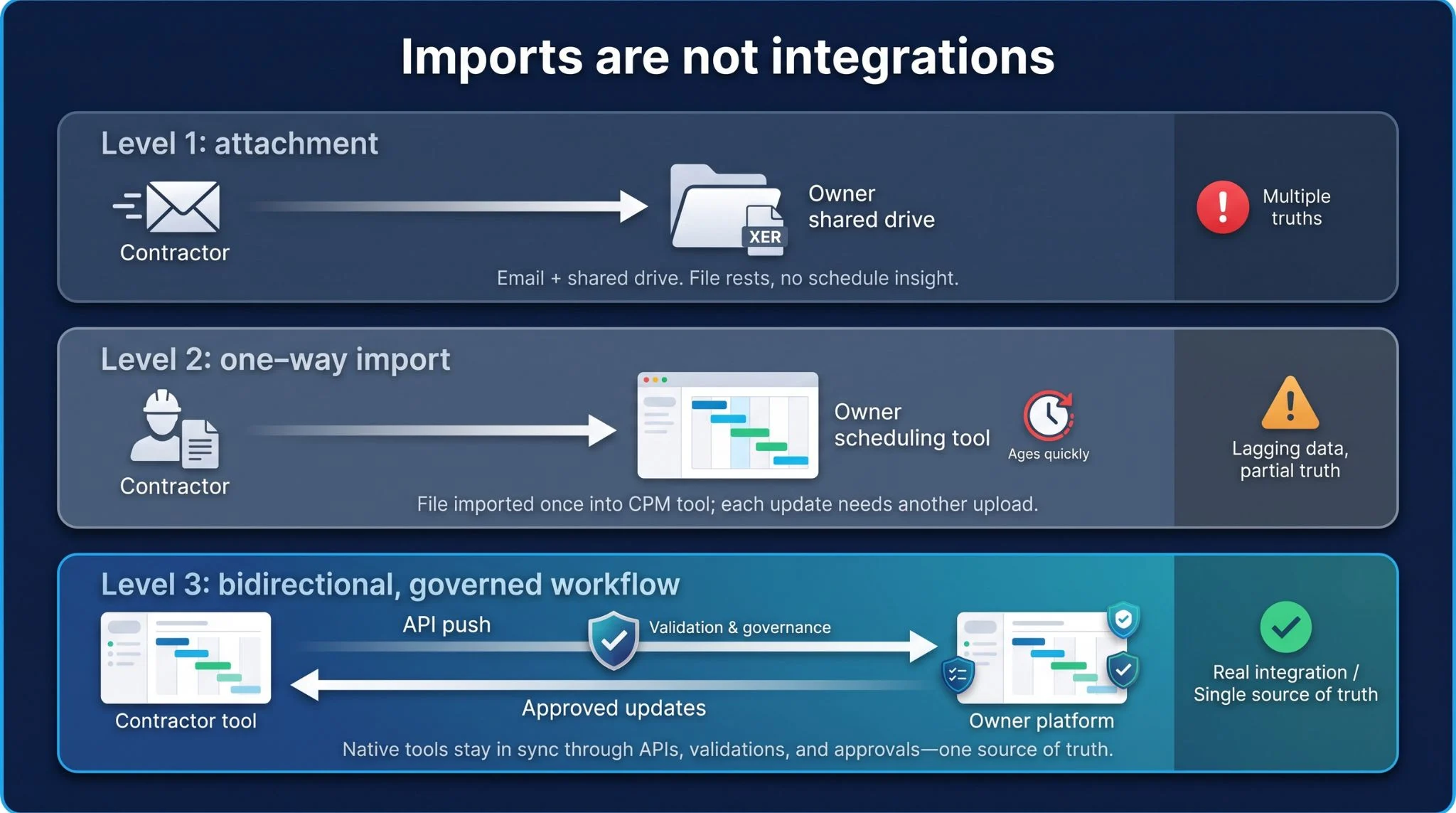
Level 1: attachment. A contractor emails an XER, someone drags it into SharePoint, and the file rests there—no parsing, no reporting, no logic insight.
Level 2: one-way import. The CPM file lands in your scheduling tool, which converts activities and codes. Useful, but the next contractor update means another import. Data ages quickly and mismatches creep in.
Level 3: bidirectional, governed workflow. The contractor works in their native tool. On save, an API pushes changes into the owner platform, which validates calendars, baselines, and logic rules, then routes the update for acceptance. Once approved, the new dates flow back, preserving one source of truth.
When vendors claim “integration,” ask to see Level 3 live. Anything less gives you multiple truths and widens the schedule-trust gap again.
Emerging specialist tools can sharpen specific weak spots
Integrated suites cover the basics, but niche apps target one link in the schedule-trust chain and dig deep.
- SmartPM audits schedule health, flagging open ends, dangling lags, and negative float within minutes of ingesting an XER.
- ALICE uses AI optioneering to generate execution scenarios; an ENR Top 400 contractor cut 28 days from a 149-million-dollar Texas highway project by running ALICE on its baseline schedule.
- Touchplan and Outbuild push Last Planner workflows to tablets, capturing Percent Plan Complete in real time and surfacing roadblocks early.
A strong platform gives you one source of truth; these specialists illuminate blind spots the big tools overlook. Budget a small pilot—one automated alert could prevent a two-week slip.
Owner software demo checklist: six moves that separate hype from help
A live demo reveals whether a platform matches its marketing. Use the script below to expose weak links before they become change orders.
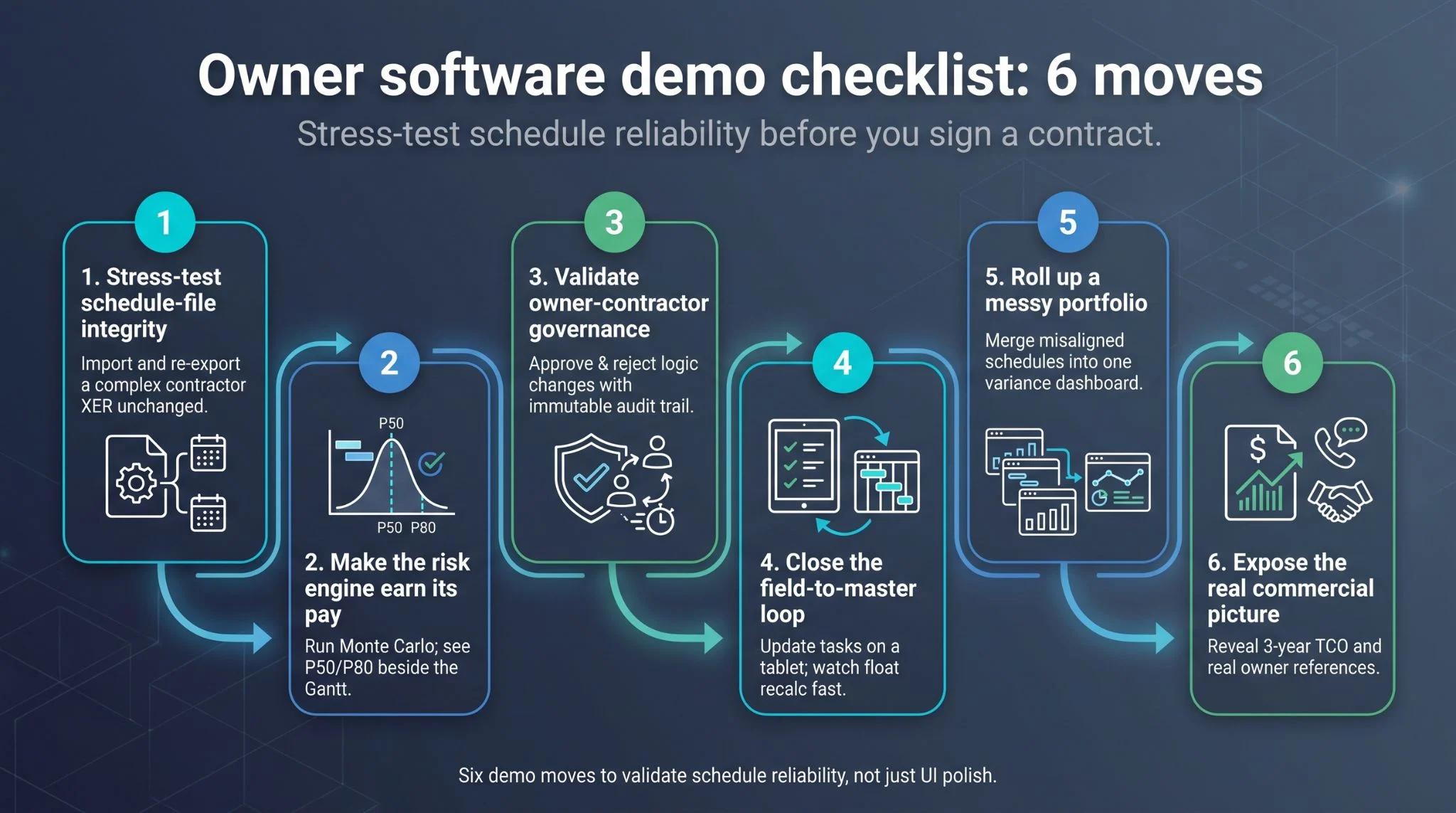
- Stress-test schedule-file integrity. Import a contractor XER or MPP with multiple calendars, resource curves, and frozen baselines. Scroll logic, constraints, and codes, then export and compare in the native tool. One lost relationship foreshadows weeks of manual cleanup.
- Make the risk engine earn its pay. Load ten three-point estimates and five discrete threats. Run Monte Carlo and view the P50 and P80 finish, tornado chart, and criticality index on the same screen as the Gantt. If results hide in a PDF, you’ll reconcile risk by spreadsheet.
- Validate owner-contractor governance. Submit an update as a mock contractor, reject one logic change, accept the rest, and confirm the audit trail locks timestamps, user IDs, and comments. No immutable log, no deal.
- Close the field-to-master loop. On a tablet, tick progress on three look-ahead tasks while offline, sync, and refresh the master schedule. Float and critical path should update immediately.
- Roll up a messy portfolio. Import two schedules with different WBS codes and calendars. In five minutes, show a single dashboard of milestone variance and risk exposure. Anything slower signals painful monthly reporting.
- Expose the real commercial picture. Request a three-year total cost of ownership—licenses, implementation, integrations, training, support—and two same-size owner references you can call this week. Hesitation on either is a warning sign.
Run these six moves and you’ll know whether the platform closes your schedule-trust gap or just paints it a different colour.
A 90-day schedule-reliability pilot
Big platforms promise plenty; a three-month pilot proves whether they deliver.
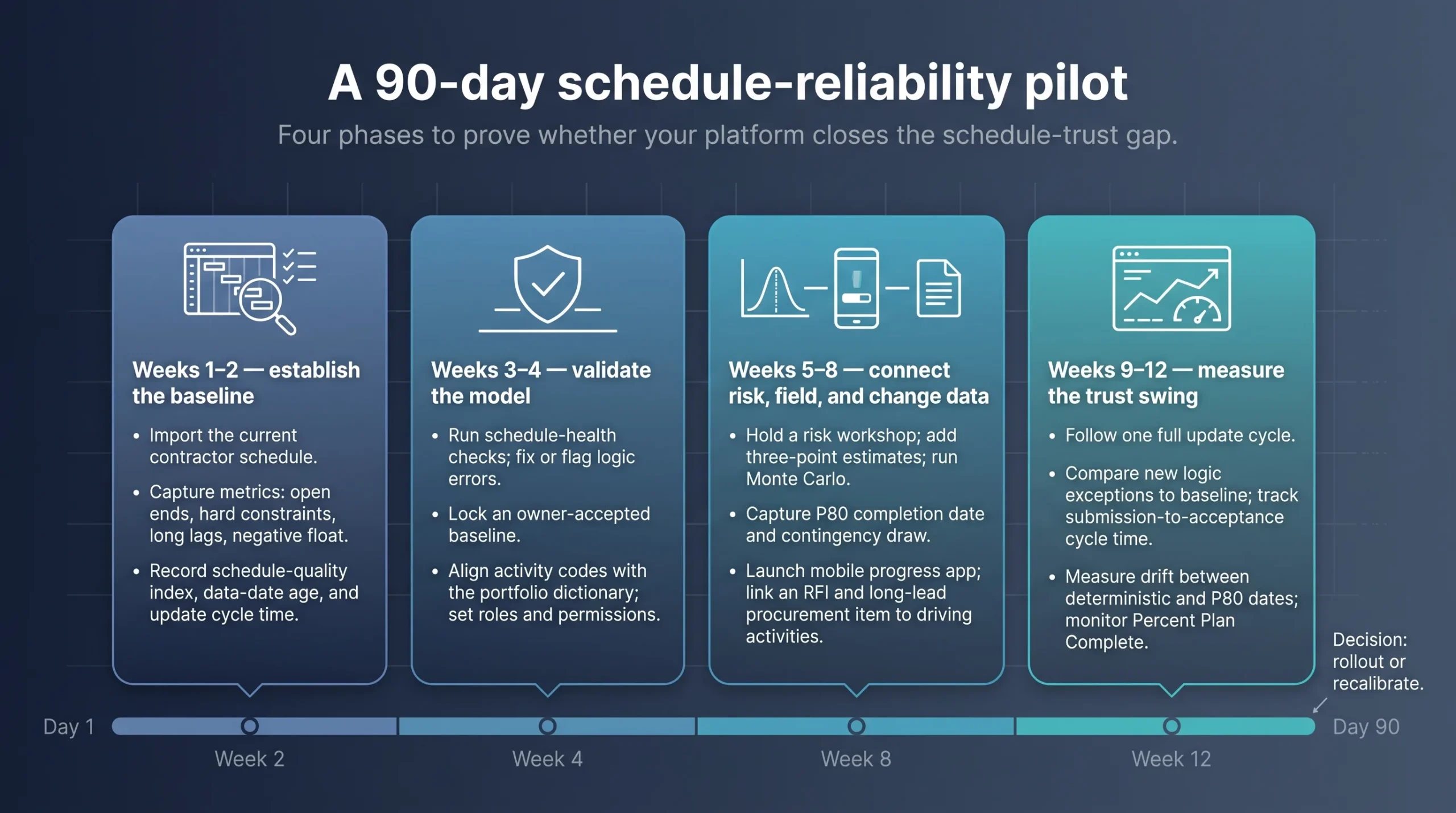
Weeks 1–2 — establish the baseline
Pick one active capital project. Import the current contractor schedule and capture six metrics: open ends, hard constraints, long lags, negative float, schedule-quality index, and data-date age. Record how long an update takes to travel from contractor hands to the owner dashboard.
Weeks 3–4 — validate the model
Run the platform’s built-in schedule-health checks, fix or flag logic errors, lock an owner-accepted baseline, and align activity codes with the portfolio dictionary. Set roles and permissions so no one edits logic in the dark.
Weeks 5–8 — connect risk, field, and change data
Hold a risk workshop, add three-point estimates, and run Monte Carlo. Capture the P80 completion date and contingency draw. Launch the mobile progress app for one discipline, and link at least one RFI and one long-lead procurement item to their driving activities to prove change traceability.
Weeks 9–12 — measure the trust swing
Follow one full update cycle. Compare new logic exceptions with baseline numbers, track cycle time from contractor submission to owner acceptance, measure drift between deterministic and P80 dates, and monitor Percent Plan Complete. Conclude with lessons learned: what closed the gap, what still leaks, and how much manual effort remains.
Fewer logic errors, faster visibility, and tighter risk alignment without extra admin effort signal a green light for rollout. If results fall short, better to learn in month three than year three.
Frequently asked questions
What makes a construction schedule reliable?
A reliable schedule is comprehensive, well-constructed, credible, and controlled, the four traits cited by the U.S. Government Accountability Office. In practice, every scope line appears in one logical network, relationships are airtight, risk is modeled with three-point estimates, and changes follow a governed, auditable process.
What is the best scheduling software for large capital projects?
It depends on your biggest gap: InEight closes multiple links—logic, risk, field, and governance—in one platform. Primavera P6 / Cloud is essential when contracts require native P6/XER files and deep CPM editing. Hexagon EcoSys excels at portfolio cost-schedule visibility. Kahua wins for configurable owner governance. Procore Scheduling delivers field-first adoption. Aconex locks down change traceability.
Is Primavera P6 still the industry standard?
Yes for file exchange. Many public contracts still require P6/XER, yet owners increasingly embed P6 inside a broader stack for risk, field feedback, and audit control.
Can scheduling software predict construction delays?
Only when the model combines sound logic with current field data. Tools that include three-point estimates and Monte Carlo simulation can output probability-based finish dates and criticality indices, as outlined in AACE guidance. Garbage in, garbage out still applies.
How often should schedules be updated?
Contracts typically call for monthly CPM updates, but field conditions change daily. High-performing teams push mobile progress weekly and aim for Percent Plan Complete above 75 percent, according to Lean Construction Institute benchmarks.
What is the difference between a CPM schedule and a look-ahead plan?
The CPM schedule defines contractual milestones and resource logic for the full project. A look-ahead targets the next three to six weeks at crew level. They must handshake daily to keep crews executing work that still protects the end date.
Can one platform replace the entire project-controls stack?
A unified suite reduces silos, though most owners still connect ERP, BIM, GIS, and specialist analytics through APIs. Choose a core platform that owns the schedule-trust chain, then bolt on niche tools for QA, AI optioneering, or advanced production planning.
Conclusion
The schedule-trust gap is real, but owners can close it by choosing software that fortifies every link: logic integrity, risk realism, field truth, change traceability, and portfolio comparability. Use the evaluation framework in this guide, stress-test vendors during demos, and run a 90-day pilot to confirm results. The right platform will turn projected dates into commitments your team—and your stakeholders—can actually trust.
Quick Search Our Blogs
Type in keywords and get instant access to related blog posts.

