
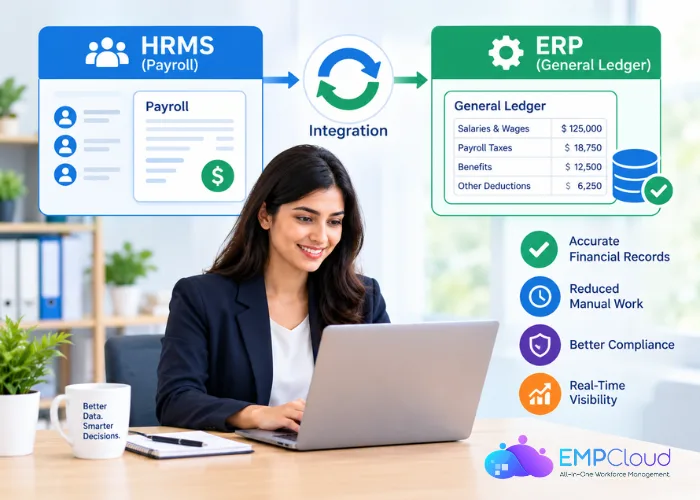
Payroll closes on Thursday. On Monday, someone from finance asks why the salary expense for the warehouse cost center is $14,000 higher than last month, and nobody in HR can answer without opening three spreadsheets. If that sounds familiar, the problem usually isn’t payroll itself. It’s the handoff between your HRMS and the ERP’s general ledger.
That handoff matters more than it looks. EY’s 2022 payroll survey of 508 payroll professionals at U.S. companies found that roughly one in five payrolls contains errors, with each error costing an average of $291 to fix. A messy integration doesn’t cause every one of those errors, but it hides them until month-end, when they’re slower and more expensive to untangle.
This guide walks HR teams through what moves between the two systems, who should own which data, and how to keep the numbers matching run after run.
What Actually Travels From Payroll to the General Ledger
Your HRMS knows people. Your ERP knows money. The integration’s job is to turn a finished pay run into a journal entry the ledger can accept, and that entry has a fairly predictable shape.
A standard payroll journal carries:
- Gross pay broken out by earning type: regular salary, hourly wages, overtime, bonuses, commissions, shift differentials.
- Employer taxes, which are a company expense on top of gross pay. In the U.S., the employer pays 6.2% for Social Security and 1.45% for Medicare, matching what’s withheld from the employee, plus federal and state unemployment taxes.
- Employee deductions, such as withheld income tax, retirement contributions, health premiums, and garnishments. These aren’t expenses. They’re money you owe to someone else.
- Employer-paid benefits, like the company’s share of health insurance or a 401(k) match.
- Net pay, the amount that actually leaves the bank account on payday.
The detail most HR teams miss is that only some of these lines hit expense accounts. Withheld taxes and deductions land in liability accounts until the company pays them to the tax agency, the benefits carrier, or the retirement plan. If your integration treats everything as “salary expense,” finance will spend every close reclassifying it by hand.
Decide Who Owns Which Data Before You Map Anything
Most integration headaches trace back to one question nobody answered: which system is the source of truth for each piece of data?
A clean split usually looks like this:
- HRMS owns employee records: hire dates, job titles, pay rates, tax setup, benefit elections, and which department or cost center each person belongs to.
- ERP owns the financial structure: legal entities, the chart of accounts, cost centers, departments, projects, and the GL account numbers themselves.
Trouble starts when both systems keep their own list of departments. HR creates “Customer Success” in the HRMS, finance calls it “CS Ops” in the ERP, and the integration either fails or quietly dumps those wages into a suspense account. Pick one owner for the cost center list, usually the ERP, and have the HRMS pull from it or validate against it.
Timing matters here too. If your finance team is in the middle of an ERP rollout, the chart of accounts and cost center structure are being redesigned right now, and that’s the cheapest moment to plan the payroll feed. If your company is bringing in outside ERP Implementation Services, ask them to put payroll mapping on the project plan as its own workstream, with an HR representative in the design sessions. Payroll tends to get bolted on after go-live, and that’s when you discover the new account structure has no clean home for your commission plans or multi-state taxes.
Get the ownership decisions written down. A one-page document listing each data element, its owner, and who approves changes will save you more time than any connector.
Map Pay Codes to GL Accounts and Cost Centers
Once ownership is settled, the real work is the mapping table. Every pay code in your HRMS needs a destination in the ledger.
Start by exporting the full list of pay codes, deduction codes, and employer contribution codes from your HRMS. You’ll likely find more than you expected, including a few that haven’t been used in years. Archive the dead ones before you map anything.
Then assign each active code:
- A GL account. Overtime might go to the same wage expense account as regular pay, or to a separate one if finance tracks it. A 401(k) deduction goes to a retirement liability account.
- A cost center rule. Most codes follow the employee’s home department. Some don’t: a project bonus might belong to the project, and a temporary assignment might need the hours charged where the work happened.
- A legal entity, if your company runs payroll for more than one entity. Wages for the Canadian subsidiary can’t land on the U.S. books.
Ask finance to review the mapping line by line. They’ll spot things HR wouldn’t, like a benefit that should be split between expense and a prepaid asset. And agree on a rule for new pay codes: nobody creates one in the HRMS without a mapped GL account, or the next payroll will fail to post.
Summary or Detailed Posting, and When to Post
You have two basic choices for how payroll lands in the ledger.
Summary posting sends one journal entry per pay run, with totals rolled up by GL account and cost center. It keeps the ledger lean and keeps individual salaries out of the ERP. Finance sees “Engineering wages: $212,400,” not what each engineer earns.
Detailed posting sends a line per employee, or even per employee per pay code. It makes drill-down easy, which helps with project costing and grant reporting, but it puts every salary into a system that far more people can see.
For most 50-500 person companies, summary posting by account and cost center is the better default. Add detail only where a specific reporting need justifies it, and only for the dimensions that need it.
Then sort out timing. Pay periods rarely line up with accounting periods. If you pay biweekly and the month ends on a Wednesday, part of that pay period’s wages belong to the closing month even though nobody’s been paid yet. Finance handles this with an accrual, but they need two things from HR: the date range of each pay period and a reliable posting date. Agree on whether the journal posts on the check date or the period end date, and stick to it every run. Switching between the two is one of the most common reasons payroll expense swings from month to month for no business reason.
Validate Before Posting, Reconcile After Every Run
A journal that posts wrong is far harder to fix than one that never posts. Build a short validation step before anything reaches the ledger:
- Debits equal credits.
- Every line has a valid GL account and an active cost center.
- Gross pay in the journal matches gross pay on the payroll register.
- No employee is charged to a cost center that was closed last month.
After posting, reconcile. Compare the payroll register totals to what landed in the ledger, then check that liability accounts clear when payments go out. If your tax withholding liability keeps growing month after month, something isn’t clearing, and it’s better to catch that in March than during a year-end audit. The reconciliation also doubles as recordkeeping, since the IRS expects employers to keep employment tax records for at least four years after filing the fourth-quarter return for the year.
Before go-live, run payroll in parallel. Here’s a sequence that works:
- Pick two or three recent, closed pay runs, including one with bonuses or other unusual items.
- Run them through the new integration in a test environment.
- Compare the generated journals to what was actually posted in the old process, line by line.
- Investigate every difference, even small ones. A $3 gap often points to a rounding or mapping rule that will cause bigger problems later.
- Get written sign-off from both the payroll lead and the controller before switching over.
Don’t skip the unusual pay run. Regular biweekly payroll is the easy case. Off-cycle checks, retro pay, and terminations with final pay are where mappings break.
Keep Salary Data Where It Belongs
Integrations tend to widen access without anyone deciding to. Before go-live, someone could only see salaries inside the HRMS. After go-live, anyone with ledger access might be able to open a payroll journal and read them.
A few habits keep that in check:
- Post summarized journals by default, as covered above, so individual pay never reaches the ERP.
- If you do need detail, restrict the payroll journal type or GL accounts to a small finance group.
- Use a dedicated integration account with only the permissions it needs, not an admin login borrowed from someone on the team.
- Mask or exclude sensitive fields like Social Security numbers and bank details from anything that leaves the HRMS. The ledger doesn’t need them.
- Review who can see payroll postings at least once a year, and whenever someone changes roles.
Keep employees’ trust in mind here. People forgive a late reimbursement. They’re far less forgiving when a coworker in another department stumbles across their salary.
A Pre-Go-Live Checklist
Use this before the first live payroll goes through the new integration:
- Data ownership document signed off by HR and finance
- Cost center and department lists synced, with one system as the owner
- Every active pay, deduction, and employer contribution code mapped to a GL account
- A rule in place that blocks new pay codes without a mapping
- Posting method (summary or detailed) and posting date agreed in writing
- Pre-posting validation rules tested
- At least two parallel runs reconciled to zero differences
- Access to payroll journals restricted and the integration account reviewed
- A named person on each side responsible for monthly reconciliation
The integration itself is usually the easy part. What keeps payroll and the general ledger in sync is the agreement behind it. Settle data ownership before you map a single code, default to summary journals so salaries stay inside the HRMS, and don’t go live until a parallel run reconciles to the cent. If you do just one thing this week, export your full pay code list and sit down with finance to give every code a home. That table is the integration’s foundation, and the rest of the project stands or falls on it.
Quick Search Our Blogs
Type in keywords and get instant access to related blog posts.

