

Most businesses don’t think about payroll until something breaks.
A salary arrives late. An overtime payment is missing. A tax deduction looks wrong. Suddenly, payroll isn’t an administrative task; it becomes a trust issue.
What makes payroll difficult is not the math. It’s coordination. Payroll pulls data from attendance systems, compensation policies, benefits, reimbursements, and compliance rules. Each piece may be owned by a different person, and the timing rarely aligns perfectly.
That’s why payroll management often feels stressful even in well-run companies. It operates on deadlines, depends on accurate inputs, and leaves little room for correction once payments are released.
This article isn’t just about defining payroll. It explains how payroll actually works inside organizations, where friction shows up, how software changes the process, and how to build a system that stays reliable as a company grows.
By the end, you should be able to look at your payroll process and clearly see what’s working, what’s fragile, and what needs structure.
In a hurry? Listen to the blog instead!
What Is Payroll Management?
Payroll management is the ongoing process of making sure employees are paid correctly, on time, and in line with legal requirements. That includes calculating earnings, applying deductions, verifying compliance, issuing payments, and keeping records that stand up to audits.
What often gets misunderstood is that payroll is less about calculation and more about coordination. The numbers are the final output. The real work happens in gathering accurate information before payroll runs.
For example, a salary change approved after the payroll cut-off doesn’t just affect one employee. It creates adjustments, additional accounting work, and sometimes employee confusion. Multiply that across teams, and payroll becomes operationally heavy.
Why Payroll Management Matters
Payroll management directly impacts employee trust, regulatory compliance, and the financial clarity leaders rely on to make informed decisions.
Accuracy protects credibility
Employees expect pay to be predictable. Even small errors can create disproportionate frustration because compensation is personal.
Compliance is built into payroll
Taxes, statutory deductions, and reporting obligations all flow through payroll. Weak payroll processes often surface first during audits.
Employee experience depends on payroll stability
Reliable payroll reduces questions, support tickets, and internal friction. Inconsistent payroll creates noise that leadership doesn’t always anticipate.
Payroll shapes financial visibility
For many companies, payroll is the largest recurring expense. When payroll data is messy, forecasting becomes guesswork.
Key Components of Payroll Management
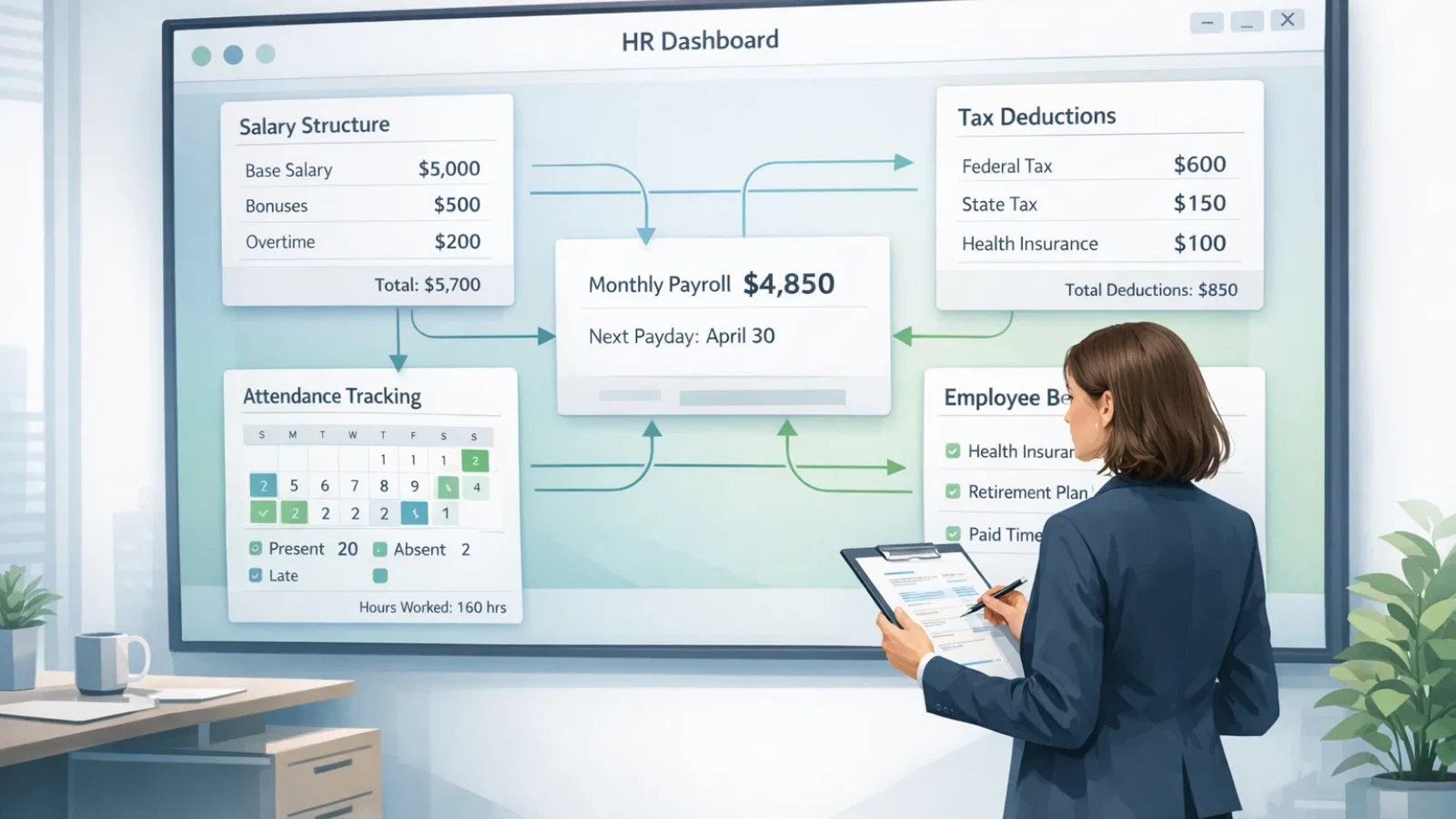
Payroll depends on several inputs that must align at the same time. When people describe payroll as complex, they’re usually describing the difficulty of synchronizing these inputs.
Salary Structure
A salary structure defines how compensation behaves over time.
Gross pay represents the total value of compensation, while net pay reflects what employees actually receive after deductions. That difference is straightforward conceptually but becomes complicated when variable pay enters the picture.
Bonuses, commissions, shift differentials, and overtime introduce movement into payroll. Without clear rules, payroll teams spend time interpreting rather than processing.
A well-defined structure reduces interpretation. It turns payroll from judgment-based to rule-based.
Deductions and Taxes
Deductions are often treated as static, but they rarely are. Changes in benefits enrollment, regulatory updates, or employee status can shift deductions month to month.
This creates one of payroll’s quiet challenges: validation. The team isn’t just calculating deductions; they’re confirming that each deduction still applies.
When that validation step is skipped, errors accumulate slowly and surface later as corrections.
Attendance and Time Data
Attendance is where payroll and daily operations intersect. Leave approvals, overtime, missed punches, and shift changes all influence final compensation.
This is also where timing becomes critical.
If attendance data is finalized late, payroll teams either delay processing or run payroll with incomplete information. Neither option is ideal.
A common scenario: overtime approvals arrive after payroll closes. The result is off-cycle payments, additional reconciliation, and employee questions that could have been avoided.
The biggest misconception here is treating payroll as a finance task. In reality, payroll accuracy often depends on operational discipline.
How the Payroll Process Works
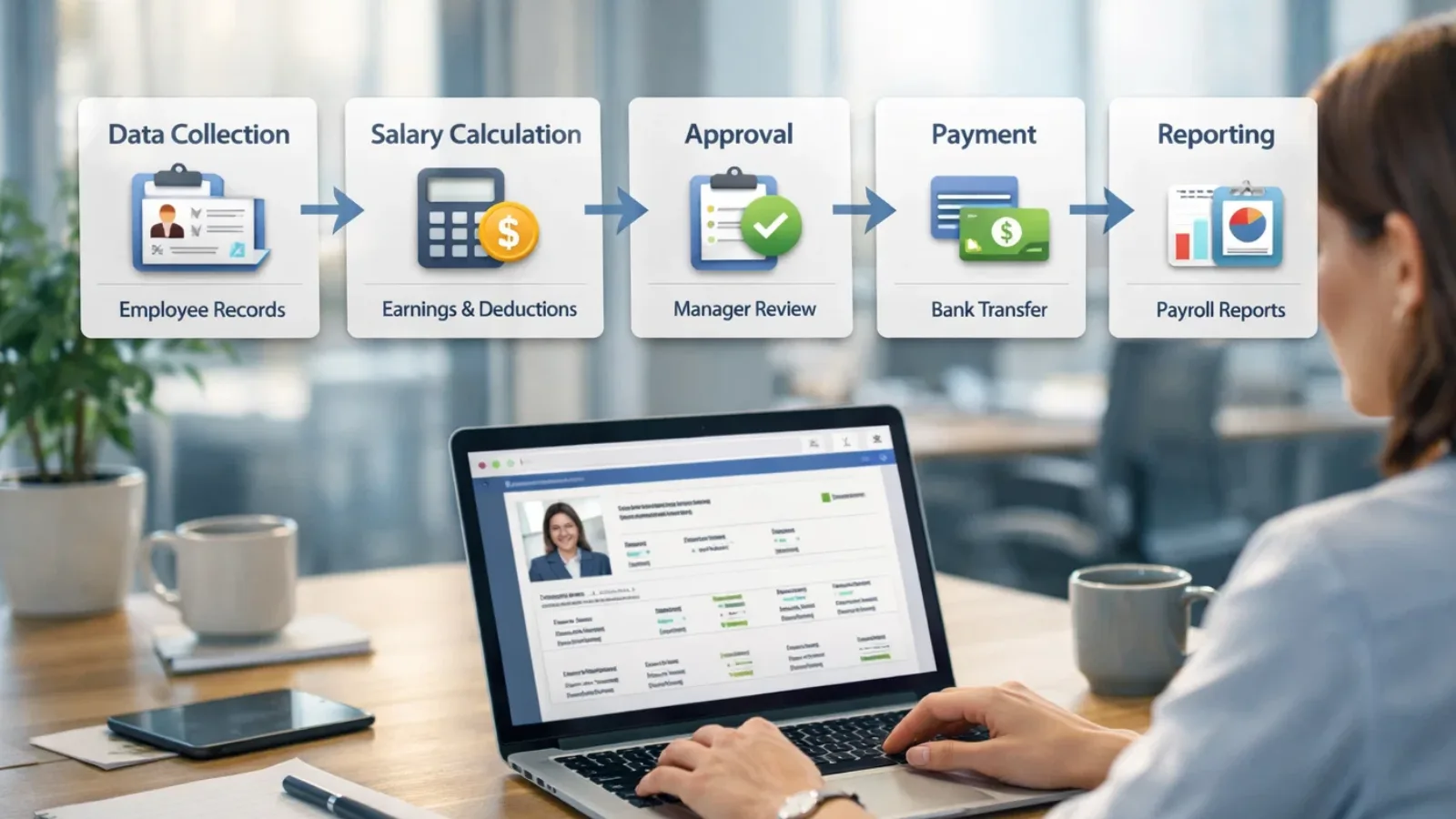
Most payroll cycles follow the same sequence, but the difference between smooth and stressful payroll lies in preparation.
The process begins with collecting employee data, not just salary figures, but also changes. Promotions, reimbursements, leave adjustments, new hires, and exits. Payroll is sensitive to movement, and growing companies have a lot of it.
Once data is collected, calculations translate policies into numbers. This is where automation helps, but automation only works when inputs are reliable. Software reduces calculation errors; it doesn’t fix missing information.
Compliance verification comes next. This step is often underestimated because nothing visible happens when compliance is correct. But skipping verification is what turns payroll mistakes into regulatory problems.
Approvals act as a checkpoint. They signal that someone has reviewed the payroll before money leaves the business. Without approvals, payroll becomes a single-point responsibility, which increases risk.
Disbursement is the visible finish, but not the end. Reporting and record keeping ensure the organization can explain what happened later, whether to leadership, auditors, or employees.
One practical shift that improves payroll immediately is introducing a firm cut-off timeline. When teams know when data must be finalized, payroll stops absorbing last-minute changes and starts operating predictably.
Most recurring payroll stress can be traced back to one pattern: adjustments happening after payroll should already be stable.
Types of Payroll Management Systems
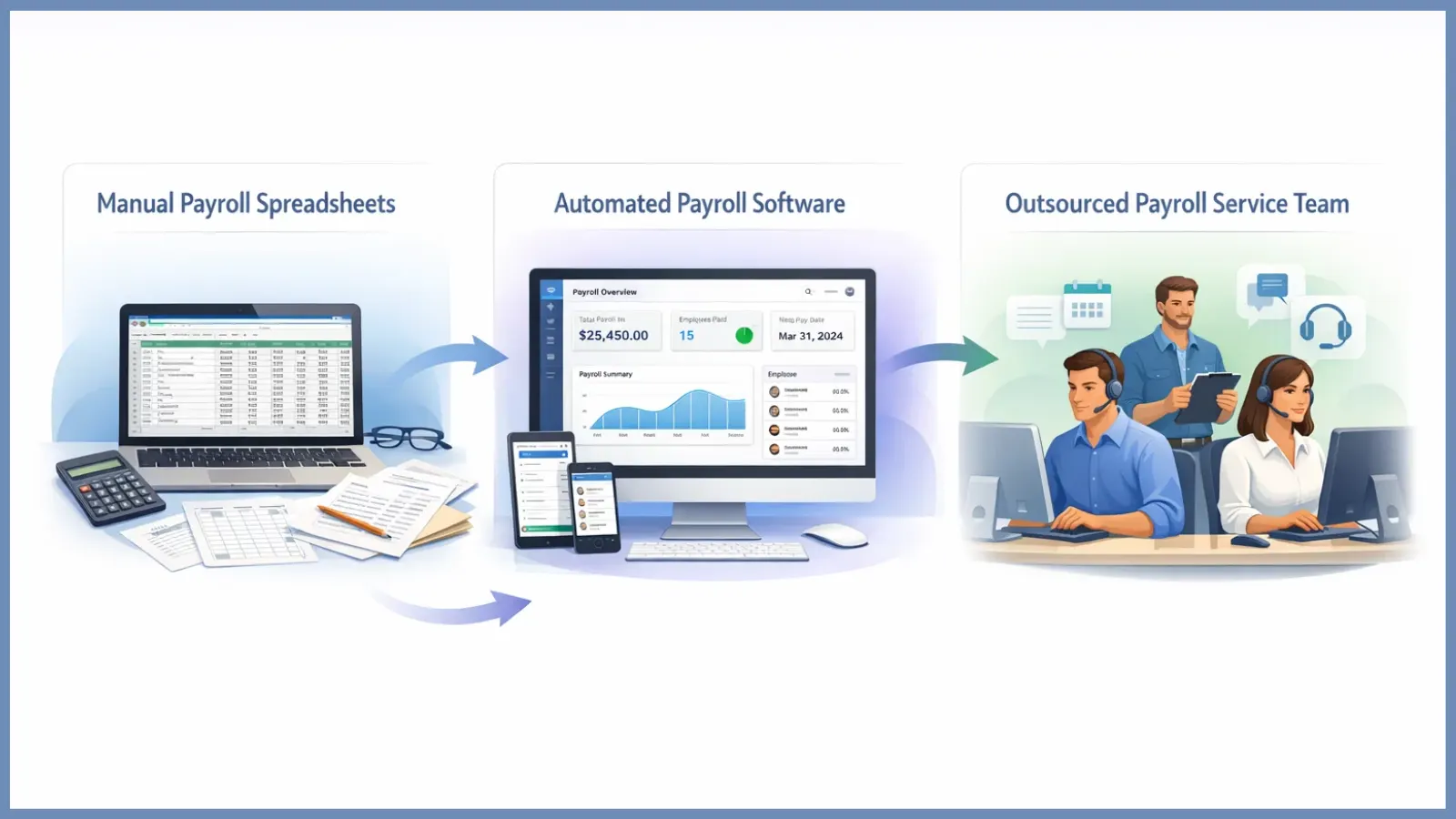
Most organizations don’t choose a payroll system once. They evolve through stages.
In early phases, payroll is handled manually because the team is small and changes are manageable. As hiring accelerates, variability increases; more reimbursements, role changes, different pay structures, and manual methods begin to strain. Eventually, payroll becomes less about effort and more about risk, which is when companies reconsider their approach.
Manual Payroll
Manual payroll typically lives in spreadsheets and email threads. It offers flexibility and low upfront cost, which is why many businesses start here.
The trade-off is dependency on individuals. Knowledge sits with whoever runs payroll, formulas become difficult to audit, and version control creates uncertainty about which file is correct.
Manual payroll works best when the headcount is stable and policies are simple. It becomes fragile when either changes.
Payroll Software (Automated)
Payroll software introduces consistency. Instead of recreating calculations each month, rules are defined once and applied repeatedly. Leveraging a dedicated payroll software for small business ensures that wage calculations, deductions, and tax withholdings run smoothly without manual errors.
The real advantage isn’t speed; it’s predictability. Approvals are tracked, deductions follow logic, and reporting becomes immediate rather than reconstructed after the fact.
However, automation doesn’t remove responsibility. It shifts focus from calculating payroll to managing inputs.
Companies that succeed with payroll software treat it as workflow infrastructure, not just a calculator.
Outsourced Payroll
Outsourcing transfers execution to specialists. This is common when compliance requirements grow faster than internal expertise or when teams want to reduce operational load.
The limitation is visibility. Organizations may lose day-to-day insight into payroll mechanics, which can slow decision-making.
A typical progression:
A startup runs payroll manually. Growth introduces software. Expansion into multiple regions leads to partial outsourcing.
Common mistake:
Selecting a system before defining how payroll should actually flow inside the company.
Tools amplify processes. They don’t design it.
Also Read
How To Calculate Payroll Accurately: Step-by-Step Guide
How To Pick Payroll Software That Fits Your Team’s Needs?
Benefits of Payroll Management Software
Teams rarely move away from spreadsheets because payroll is too difficult. The real trigger is the growing cost of uncertainty. Small calculation errors, missing records, and last-minute fixes slowly consume time and create risk.
Automation helps by removing repetitive tasks, but its real impact is clarity. When payroll runs on structured software, calculations follow set rules, approvals are documented, and records are easy to retrieve instead of being hidden across files. That shift reduces the effort spent correcting mistakes after each payroll cycle.
Better visibility is another advantage. Leadership can track payroll expenses over time, HR teams respond to employee queries without digging through folders, and finance teams generate reports without rebuilding data from scratch.
Employee self-service also changes day-to-day operations. When employees can download payslips, update personal details, or check salary components themselves, payroll teams spend less time handling routine requests and more time reviewing accuracy.
Integration plays a major role here. Payroll connected with attendance and HR data removes duplicate entries, one of the most common reasons errors happen in the first place.
This is where platforms like EmpCloud fit naturally into the workflow. Its automated payroll capabilities ensure calculations run accurately while reducing manual intervention. A centralized system means data flows from attendance to salary processing without constant re-entry, helping teams maintain consistency.
The value isn’t only speed. Organizations often notice fewer corrections, clearer accountability, and stronger audit trails because every payroll action is recorded in one place. EmpCloud’s approach focuses on delivering an accurate, hassle-free payroll system that supports both compliance and everyday efficiency.
One important reality remains: software strengthens good processes and reveals gaps in weak ones. That visibility is what ultimately helps teams improve payroll, not just complete it faster.
Common Payroll Challenges Businesses Face
Payroll challenges are rarely dramatic failures. They’re recurring friction points that accumulate.
Compliance complexity is a major issue. Regulations change, interpretations vary, and keeping policies aligned requires ongoing attention. When compliance is treated as a one-time setup, gaps appear.
Another challenge is data dependency. Payroll accuracy relies heavily on attendance being finalized on time. When approvals lag, payroll absorbs the uncertainty.
Multi-location teams add another layer. Different rules, schedules, and policies create variation that manual methods struggle to handle consistently.
Manual overrides are particularly risky. They solve immediate problems but bypass controls, making it harder to explain payroll decisions later.
Corrections after payroll closes create operational noise. They require additional accounting work and often lead employees to question reliability.
Security is also increasingly relevant. Payroll contains sensitive financial information, and access management becomes critical as teams grow.
A common real-world example is late statutory filing. The financial penalty is visible, but the underlying issue is usually process discipline rather than knowledge.
The pattern across these challenges is clear: payroll problems often signal coordination gaps elsewhere in the organization.
How to Choose the Right Payroll Management Software
Choosing payroll software is less about features and more about fit.
The first question isn’t what the software can do; it’s what your payroll process needs to handle. Headcount growth, policy complexity, approval layers, and compliance exposure all shape that decision.
Must-Have Capabilities
Automation should reduce manual calculation without hiding the logic. Compliance support should update rules without requiring constant monitoring. Integrations should remove duplicate entries rather than create additional syncing work. Reporting should answer questions quickly, not require exports and rebuilding.
Questions Worth Asking Vendors
How does the system handle payroll changes mid-cycle?
What happens when attendance is incomplete?
Can approval workflows reflect real organizational structure?
How visible are adjustments after payroll closes?
These questions reveal whether software supports reality or assumes ideal conditions.
Pricing Considerations
Subscription cost is the only variable. The real cost of payroll includes time spent fixing errors, compliance exposure, and reporting effort. Software that reduces those areas often delivers value beyond its price.
Scalability
Payroll systems should accommodate growth without requiring process redesign. That includes supporting more employees, more pay variations, and more reporting needs.
Many growing teams adopt platforms like Emp Cloud because they centralize payroll data alongside attendance and HR workflows, which reduces coordination overhead as complexity increases.
Frequent mistake:
Choosing the cheapest solution and then rebuilding the process within a year.
Short-term savings can create long-term friction.
How EmpCloud Supports Efficient Payroll Management ?

As payroll complexity increases, many organizations adopt software that simplifies payroll administration while maintaining accuracy and compliance. Platforms like EmpCloud are designed to streamline payroll management by bringing key payroll functions into a single system.
EmpCloud helps organizations manage payroll by supporting employee data management, salary structure configuration, automated calculations, and payroll reporting. By organizing payroll information and calculations within one platform, payroll teams can process salaries more efficiently while maintaining consistency.
Key Payroll Capabilities in EmpCloud
Employee Data Management
EmpCloud efficiently manages and maintains the comprehensive employee data required for payroll processing.
Auto Salary and Wage Calculations
The system automates salary and wage calculations to support timely and accurate payroll processing.
Salary Structure Customization
Organizations can customize salary structures to align payroll with their compensation policies and organizational requirements.
Payroll Reporting and Analytics
EmpCloud provides payroll reports and analytics that help organizations review payroll data and support decision-making.
Employee Self-Service (ESS)
Employees can access their payroll information through self-service features, allowing them to view salary details and payroll records when needed.
Payslip Generation and Distribution
The platform streamlines the generation and secure distribution of employee payslips.
Mobile Accessibility
Payroll information can be accessed through mobile devices, allowing payroll management on the go.
Year-End Processing
The platform supports year-end payroll activities to ensure accurate reporting and documentation.
Conclusion
Payroll management is about more than processing salaries; it’s about creating a system employees can trust. When payroll runs with clear rules, accurate data, and proper approvals, businesses reduce errors, stay compliant, and gain better cost visibility.
Moving to a payroll management system or payroll management software helps teams shift from fixing problems to preventing them. Strong payroll management ultimately brings consistency, transparency, and confidence to everyday operations.
FAQ
What is payroll management?
Payroll management is the process of calculating salaries, applying deductions, ensuring compliance, and paying employees on time.
What is a payroll management system?
It’s the structure or workflow used to organize payroll activities, from data collection to payment and reporting.
What is payroll management software?
Software that automates salary calculations, deductions, compliance, and payroll records.
Why is payroll management important?
It ensures accurate pay, legal compliance, and clear visibility into employee costs.
When should businesses use payroll management software?
When manual payroll becomes time-consuming, error-prone, or difficult to scale.
Quick Search Our Blogs
Type in keywords and get instant access to related blog posts.

